Panic Mode On (78) Server Problems?
Message boards :
Number crunching :
Panic Mode On (78) Server Problems?
Message board moderation
Previous · 1 . . . 6 · 7 · 8 · 9 · 10 · 11 · 12 . . . 22 · Next
| Author | Message |
|---|---|
 Fred E. Fred E. Send message Joined: 22 Jul 99 Posts: 768 Credit: 24,140,697 RAC: 0 
|
I don't know how it's this time .. (no admin announced it) .. All I know is that Richard Haselgrove posted this earlier in this thread: (Message 1302257) I've just had a note back from Eric: Of course more work was done Monday, but I don't know what was done. Another Fred Support SETI@home when you search the Web with GoodSearch or shop online with GoodShop. 
ID: 1302774 ·  |
Richard Haselgrove  Send message Joined: 4 Jul 99 Posts: 14650 Credit: 200,643,578 RAC: 874 
 |
Oh dear. I think they've turned on too much, too quickly. I've just created 18 new ghosts. ID: 1302777 · |
|
Fred E. Send message Joined: 22 Jul 99 Posts: 768 Credit: 24,140,697 RAC: 0
|
Oh dear. I think they've turned on too much, too quickly. I've just created 18 new ghosts.Still doing the ghost thing? Getting timeouts? +1 on the too much too quick comment. I've said this before, but the runaway hosts and large number of "Results" in the field last weekend were because Scheduler was assigning new work to hosts that had ghosts that needed to be resent. I don't recall it doing that in the past. Must have been a recent change, so maybe they can find it (but scheduler code is probably a tangled web by now). Go back to "ghosts first" and you don't need steps like these limits. Another Fred Support SETI@home when you search the Web with GoodSearch or shop online with GoodShop.
ID: 1302780 · |
Bernie Vine  Send message Joined: 26 May 99 Posts: 9954 Credit: 103,452,613 RAC: 328
|
Oh dear. I think they've turned on too much, too quickly. I've just created 18 new ghosts. Yes, It also might have been nice for just a few words from someone at the lab as to what they have done and why. I realise that only the people who come here would see, but there is a hardcore who would like to know if their efforts are worth it. I feel ignored here. Unfortunately I think the project is trying to do too much with not enough staff. Sadly I feel my time and electricity is better used elsewhere. ID: 1302783 · |
|
Richard Haselgrove Send message Joined: 4 Jul 99 Posts: 14650 Credit: 200,643,578 RAC: 874
|
Oh dear. I think they've turned on too much, too quickly. I've just created 18 new ghosts. That particular host didn't have any ghosts before the experiment, which is why I tried it first. I did get all 18 of them resent at the next attempt. I have the beginnings of another theory. Matt has commented in the past that database performance drops off dramatically when the table size grows beyond what can fit in memory (so data has to be fetched from the phyical disks when called for). If a particular host asks for work for the first time in a while, the request takes a long time because of all the disk thrashing. But if you ask again a few minutes later, the host records are still in memory and haven't been overwritten by other hosts. So the second attempt has a better chance of succeeding. After compaction of the database during maintenance tonight, and a few more days of quota, we might see an improvement. If not, back to the drawing board... ID: 1302791 · |
|
fscheel Send message Joined: 13 Apr 12 Posts: 73 Credit: 11,135,641 RAC: 0
|
Another newbie question. Is there a way to easily see how many ghost tasks I have? Frank ID: 1302795 · |
|
Fred E. Send message Joined: 22 Jul 99 Posts: 768 Credit: 24,140,697 RAC: 0
|
Another newbie question. Easiest way is BOINC Tasks. It will give you task counts and the sum of estimated completion times for each device on the Projects tab, and a split by application /status on the Tasks tab. Compare the cpu + gpu counts to the website counts to determine how many ghosts you have. This is how I can tell at a glance that I'm below the CPU limit. It enables you to monitor and control all of your computers from one host using the IP addresses. Test drive it on one of your hosts - think you'll like the improved user interface. There are also some commands to count the tasks in BOINC Mgr, but I've forgotten them. Anyone? Another Fred Support SETI@home when you search the Web with GoodSearch or shop online with GoodShop.
ID: 1302798 · |
|
fscheel Send message Joined: 13 Apr 12 Posts: 73 Credit: 11,135,641 RAC: 0
|
Another newbie question. I am using Boinc Tasks and really like it. Unless I am missing something, I still have to go to the web site to get the total in progress count.. Thanks...Frank ID: 1302803 · |
[B^S] madmac  Send message Joined: 9 Feb 04 Posts: 1175 Credit: 4,754,897 RAC: 0
|
Myself it is mainly downloads that I am having trouble with now get 10 waiting to download mainly http errors so hopefully it will sort itself out IN the end had to hit the retry button and they just downloaded very quickly 
ID: 1302805 · |
|
Fred E. Send message Joined: 22 Jul 99 Posts: 768 Credit: 24,140,697 RAC: 0
|
. I am using Boinc Tasks and really like it. Unless I am missing something, I still have to go to the web site to get the total in progress count.. No, you have to check the website and compare to what BOINC Tasks shows. BOINC doesn't know anything about ghosts - it never got word of the assignment and instructions to download them. So, you have to compare BT's numbers with the project's numbers on the website. Another Fred Support SETI@home when you search the Web with GoodSearch or shop online with GoodShop.
ID: 1302807 · |
|
Fred E. Send message Joined: 22 Jul 99 Posts: 768 Credit: 24,140,697 RAC: 0
|
I'm now down to 204 CPU tasks now vs. the 300 that we think is the limit for 6 cores, but I'm still getting the limits message. That's true whether the work request is CPU only or CPU+GPU. Is anyone else experiencing this? Another Fred Support SETI@home when you search the Web with GoodSearch or shop online with GoodShop.
ID: 1302821 · |
|
fscheel Send message Joined: 13 Apr 12 Posts: 73 Credit: 11,135,641 RAC: 0
|
I'm now down to 204 CPU tasks now vs. the 300 that we think is the limit for 6 cores, but I'm still getting the limits message. That's true whether the work request is CPU only or CPU+GPU. Is anyone else experiencing this? More or less. Sitting here trying to figure it out and not having much luck at it. ID: 1302824 · |
S@NL - John van Gorsel  Send message Joined: 5 Jul 99 Posts: 193 Credit: 139,673,078 RAC: 0 
|
I'm now down to 204 CPU tasks now vs. the 300 that we think is the limit for 6 cores, but I'm still getting the limits message. I assume that the limit is based on the number of tasks as reported on the account page, so including "ghosts". Chances are that you still get the "limit reached" message when you are completely out of work... Seti@Netherlands website ID: 1302828 · |
|
Fred E. Send message Joined: 22 Jul 99 Posts: 768 Credit: 24,140,697 RAC: 0
|
I'm now down to 204 CPU tasks now vs. the 300 that we think is the limit for 6 cores, but I'm still getting the limits message. I assume that the limit is based on the number of tasks as reported on the account page, so including "ghosts". I don't have any ghosts, results pending report, or downloads in progress. Both BoincTasks and the website's task page show 1661 tasks in progress. But I agree if someone has ghosts, the enforcement of the limit would be based on what Scheduler thinks you should have, whether downloaded or not. Another Fred Support SETI@home when you search the Web with GoodSearch or shop online with GoodShop.
ID: 1302831 · |
HAL9000  Send message Joined: 11 Sep 99 Posts: 6534 Credit: 196,805,888 RAC: 57
 |
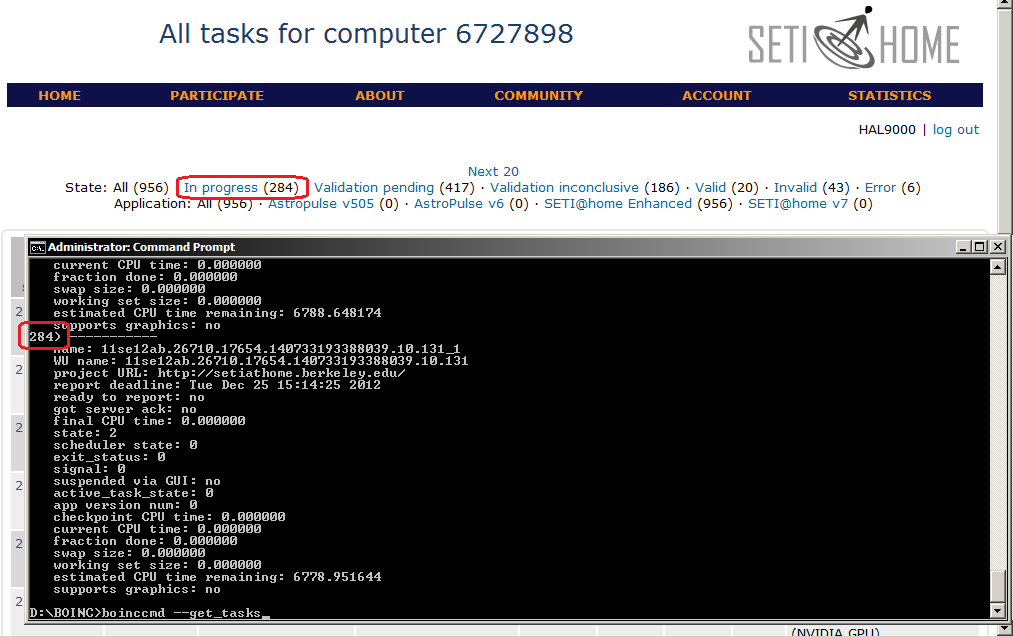
Another newbie question. I don't know about the manager but you can get your task count from the command line. 1) From the command line type: boinccmd --get_tasks 2) Then compare it to the In progress count the host task page. http://www.hal6000.com/seti/images/check_ghost.png If your local count is lower than the server count you should call the Ghostbusters. EDIT: I guess I have been lucky. Power didn't go out even though we are right in the middle of path that hurricane Sandy took. No real problems uploading, downloading, reporting, or requesting work. SETI@home classic workunits: 93,865 CPU time: 863,447 hours  Join the [url=http://tinyurl.com/8y46zvu]BP6/VP6 User Group[ Join the [url=http://tinyurl.com/8y46zvu]BP6/VP6 User Group[
ID: 1302835 · |
|
Richard Haselgrove Send message Joined: 4 Jul 99 Posts: 14650 Credit: 200,643,578 RAC: 874
|
I'm now down to 204 CPU tasks now vs. the 300 that we think is the limit for 6 cores, but I'm still getting the limits message. Actually, that's not the way it worked last time we were running a quota. My message 1161932 was terse: One blessing is that ghosts don't count towards the 'tasks in progress' quota limit. but I remember checking carefully before I posted. At that time - not saying it's necessarily the same now - the quota was calculated on the basis of the tasks that the host reported that it had. ID: 1302837 · |
|
Tron Send message Joined: 16 Aug 09 Posts: 180 Credit: 2,250,468 RAC: 0
|
Tue 06 Nov 2012 06:33:18 PM EST | SETI@home | update requested by user
Tue 06 Nov 2012 06:33:21 PM EST | SETI@home | Sending scheduler request: Requested by user.
Tue 06 Nov 2012 06:33:21 PM EST | SETI@home | Reporting 72 completed tasks
Tue 06 Nov 2012 06:33:21 PM EST | SETI@home | Requesting new tasks for CPU and NVIDIA
Tue 06 Nov 2012 06:34:05 PM EST | SETI@home | Scheduler request failed: HTTP internal server error
ut ohh ID: 1302900 · |
|
BarryAZ Send message Joined: 1 Apr 01 Posts: 2580 Credit: 16,982,517 RAC: 0
|
You might consider not requesting new work until the folks back at the farm figure out what has been in 'mangled condition' regarding the scheduler for the past week or so. That's what other BOINC projects are for <smile> Tue 06 Nov 2012 06:33:18 PM EST | SETI@home | update requested by user Tue 06 Nov 2012 06:33:21 PM EST | SETI@home | Sending scheduler request: Requested by user. Tue 06 Nov 2012 06:33:21 PM EST | SETI@home | Reporting 72 completed tasks Tue 06 Nov 2012 06:33:21 PM EST | SETI@home | Requesting new tasks for CPU and NVIDIA Tue 06 Nov 2012 06:34:05 PM EST | SETI@home | Scheduler request failed: HTTP internal server error ID: 1302906 · |
|
Tron Send message Joined: 16 Aug 09 Posts: 180 Credit: 2,250,468 RAC: 0
|
You might consider not requesting new work until the folks back at the farm figure out what has been in 'mangled condition' regarding the scheduler for the past week or so. They had all day to figure that out. looks like they haven’t ... Internal server error is an important message that justifies posting. Your suggestion has been considered <roll> ID: 1302915 · |
|
Claggy Send message Joined: 5 Jul 99 Posts: 4654 Credit: 47,537,079 RAC: 4
|
You might consider not requesting new work until the folks back at the farm figure out what has been in 'mangled condition' regarding the scheduler for the past week or so. That's fairly normal on a recovery from an outage, if you have <max_tasks_reported> set low enough it'll go through: 07/11/2012 00:16:15 SETI@home [sched_op_debug] Starting scheduler request 07/11/2012 00:16:15 SETI@home Sending scheduler request: Requested by user. 07/11/2012 00:16:15 SETI@home Reporting 10 completed tasks, not requesting new tasks 07/11/2012 00:16:15 SETI@home [sched_op_debug] CPU work request: 0.00 seconds; 0.00 CPUs 07/11/2012 00:16:15 SETI@home [sched_op_debug] NVIDIA GPU work request: 0.00 seconds; 0.00 GPUs 07/11/2012 00:16:15 SETI@home [sched_op_debug] ATI GPU work request: 0.00 seconds; 0.00 GPUs 07/11/2012 00:16:55 SETI@home Scheduler request completed 07/11/2012 00:16:55 SETI@home [sched_op_debug] Server version 701 07/11/2012 00:16:55 SETI@home Project requested delay of 303 seconds 07/11/2012 00:16:55 SETI@home [sched_op_debug] handle_scheduler_reply(): got ack for result 23jn11ae.18408.22971.140733193388044.10.156_0 07/11/2012 00:16:55 SETI@home [sched_op_debug] handle_scheduler_reply(): got ack for result 23jn11ae.18408.22971.140733193388044.10.152_0 07/11/2012 00:16:55 SETI@home [sched_op_debug] handle_scheduler_reply(): got ack for result 23jn11ae.18408.22971.140733193388044.10.150_0 07/11/2012 00:16:55 SETI@home [sched_op_debug] handle_scheduler_reply(): got ack for result 23jn11ae.18408.22971.140733193388044.10.149_1 07/11/2012 00:16:55 SETI@home [sched_op_debug] handle_scheduler_reply(): got ack for result 23jn11ae.18408.22971.140733193388044.10.148_1 07/11/2012 00:16:55 SETI@home [sched_op_debug] handle_scheduler_reply(): got ack for result 23jn11ae.18408.22971.140733193388044.10.144_0 07/11/2012 00:16:55 SETI@home [sched_op_debug] handle_scheduler_reply(): got ack for result 23jn11ae.18408.22971.140733193388044.10.138_1 07/11/2012 00:16:55 SETI@home [sched_op_debug] handle_scheduler_reply(): got ack for result 23jn11ae.18408.22971.140733193388044.10.131_1 07/11/2012 00:16:55 SETI@home [sched_op_debug] handle_scheduler_reply(): got ack for result 23jn11ae.18408.22971.140733193388044.10.130_1 07/11/2012 00:16:55 SETI@home [sched_op_debug] handle_scheduler_reply(): got ack for result 23jn11ae.18408.22971.140733193388044.10.128_0 07/11/2012 00:16:55 SETI@home [sched_op_debug] Deferring communication for 5 min 3 sec 07/11/2012 00:16:55 SETI@home [sched_op_debug] Reason: requested by project Claggy ID: 1302921 · |

©2024 University of California
SETI@home and Astropulse are funded by grants from the National Science Foundation, NASA, and donations from SETI@home volunteers. AstroPulse is funded in part by the NSF through grant AST-0307956.