"A lot of" Invalid results lately -- possibly my GPU?
Message boards :
Number crunching :
"A lot of" Invalid results lately -- possibly my GPU?
Message board moderation
| Author | Message |
|---|---|
 Samuel S. Cummings Samuel S. Cummings  Send message Joined: 27 Jun 02 Posts: 6 Credit: 4,865,162 RAC: 0 |
Hi there! David/N9JFE wrote me a few days ago, stating that my computer has been returning a lot of negative results lately; most likely as a result of my GPU. ...I haven't the first clue how to fix this. Any help would be freakin' awesome. Thanks! -- Samuel ;] CPU: AuthenticAMD AMD Phenom(tm) 9650 Quad-Core Processor [Family 16 Model 2 Stepping 3] (4 processors) GPU: <-- Which was recently replaced... NVIDIA GeForce GTX 560 Ti (1023MB) driver: 301.42 OS: Microsoft Windows 7 Ultimate x64 Edition, (06.01.7600.00) Samuel S. Cummings SETI@Home contributor since 2002! "In order to make an apple pie from scratch, you must first create the universe." -Carl Sagan 
ID: 1304676 ·  |
|
Fred E. Send message Joined: 22 Jul 99 Posts: 768 Credit: 24,140,697 RAC: 0 
|
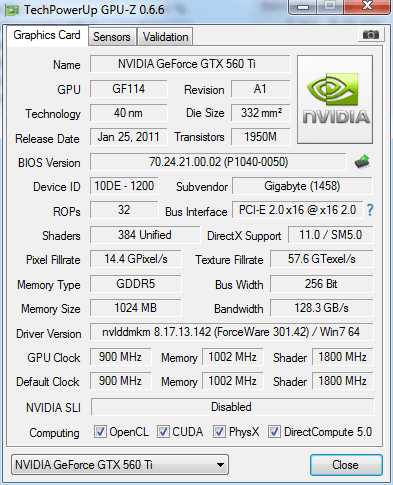
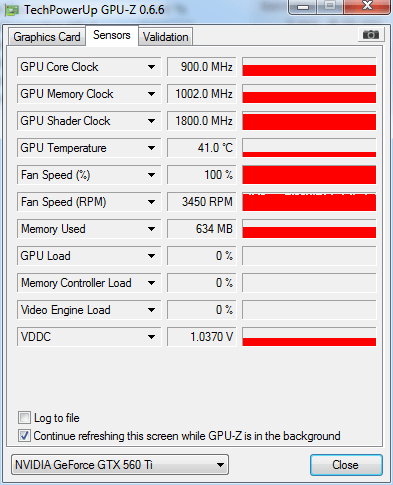
560 TI's sometimes have voltage or other power issues. What is your power supply's rating? Do you have a utility that show's the gpu's speed, voltage, etc? If not, try GPU-Z. Determine what voltage it is getting. Also check the temperature and let us know that. There are some others that can help more than I, but they will want to know this info. Another Fred Support SETI@home when you search the Web with GoodSearch or shop online with GoodShop. 
ID: 1304696 · |
|
Samuel S. Cummings Send message Joined: 27 Jun 02 Posts: 6 Credit: 4,865,162 RAC: 0 |
Okay, took some screenshots of my info... That you can find below. As for my P/S, it's either an 800 or an 850, power *SHOULDN'T* be a problem. I wouldn't imagine so, anyway. As for heat, I have the fan clocked at 100% constantly to dissipate heat; when I'm just surfing, it runs at about 108 degrees. When SETI or a game is running, it can top out at 115-ish. Any ideas? -- Samuel ;] 1 -> http://gpuz.techpowerup.com/12/11/11/2da.png 2 -> http://gpuz.techpowerup.com/12/11/11/azz.png ID: 1304931 · |
arkayn  Send message Joined: 14 May 99 Posts: 4438 Credit: 55,006,323 RAC: 0
|
Linked the images for you. Okay, took some screenshots of my info... That you can find below. 
ID: 1304948 · |
tbret  Send message Joined: 28 May 99 Posts: 3380 Credit: 296,162,071 RAC: 40
 |
I'll try --- As you've already heard, 560Ti cards can be a problem. First, the obvious; make sure the card is seated fully in the PCIe slot. I know that sounds sort-of basic, but you might want to check that it isn't in there the least bit crooked. Second, be sure the power connectors are *fully* seated. Again, sounds obvious, but check it anyway. You say that you recently replaced the GPU. Often you have to do a reinstall of the drivers using the "Custom" and "Clean Install" options; even if you are reinstalling the driver version you are already using. After you do those things, turn the computer completely off, give it a few seconds, turn it back on (stuff can get "stuck" in memory and a powered re-start, or even a driver reinstall, won't always clear it; turn it off). If you switched from an ATI card to your 560Ti, you'll want to run something like DriverSweeper (downloadable, but watch all the add-ons in the installation package) and get rid of every last bit of ATI driver references in the registry. DO THE FOLLOWING AT YOUR OWN RISK AND BE CAREFUL!!! IF YOU BRICK YOUR CARD IT ISN'T MY FAULT!! I can't tell from looking which version of the Gigabyte card you are running. I assume from the 1800MHz shader value that it's one of the factory overclocked models. I can't tell how old it is. If it ISN'T a factory overclock card, reset the card to factory (NVIDIA reference) speeds and restart the computer. If it IS a factory overclock card that's not brand-spanking-new: I have two Gigabyte factory overclocked 560Tis that gave me fits until I upgraded the BIOS on the cards. Before I updated the BIOS I had run the voltages up, run the clocks down, and done all sorts of variations trying to make them reliable without any success. After the BIOS update they are among my most reliable favorites. There's a link to the page you need to download the BIOS utility: http://www.gigabyte.us/products/product-page.aspx?pid=3775&dl=1#utility Let us know how it goes. EDIT: One of mine gave me trouble recently. It was solved by a shut down, counting to ten, and restarting. It happens. It's seems like the 560Ti is more prone to the problem than the others. ID: 1304992 · |
|
Samuel S. Cummings Send message Joined: 27 Jun 02 Posts: 6 Credit: 4,865,162 RAC: 0 |
Thanks a lot for the help, folks! I'll look into it ASAP. I'll keep ya updated... Warmly, -- Samuel ID: 1306010 · |
juan BFP     Send message Joined: 16 Mar 07 Posts: 9786 Credit: 572,710,851 RAC: 3,799 
 |
Bret, Don´t forget to mention the driver version, don´t cleary remember but the 301.42 have the sleeping bug? I don´t use 560Ti anymore, but if not shure go to a newer compatible driver, you have few so you could say what is the best for that GPU. 
ID: 1306053 · |
|
tbret Send message Joined: 28 May 99 Posts: 3380 Credit: 296,162,071 RAC: 40
|
Bret, Don´t forget to mention the driver version, don´t cleary remember but the 301.42 have the sleeping bug? I don´t use 560Ti anymore, but if not shure go to a newer compatible driver, you have few so you could say what is the best for that GPU. I'm pretty sure 301.42 is clean. I don't know which one is best. ID: 1306058 · |
Richard Haselgrove  Send message Joined: 4 Jul 99 Posts: 14653 Credit: 200,643,578 RAC: 874 
|
Bret, Don´t forget to mention the driver version, don´t cleary remember but the 301.42 have the sleeping bug? I don´t use 560Ti anymore, but if not shure go to a newer compatible driver, you have few so you could say what is the best for that GPU. Affected driver version numbers are listed in my sticky 'NVidia driver problems...' thread. ID: 1306059 · |

©2024 University of California
SETI@home and Astropulse are funded by grants from the National Science Foundation, NASA, and donations from SETI@home volunteers. AstroPulse is funded in part by the NSF through grant AST-0307956.