Posts by BigWaveSurfer
|
21)
Message boards :
Number crunching :
Updated GPU - Anything special I need to do?
(Message 1565687)
Posted 1 Sep 2014 by  BigWaveSurfer BigWaveSurfer
Post: Do I need to do anything 'special'? Question though, is it possible to crunch multiple units on the GPU running one core on the CPU? This new card is in an older desktop with a Pentium D 3.6: http://ark.intel.com/products/27522/Intel-Pentium-D-Processor-960-4M-Cache-3_60-GHz-800-MHz-FSB I have it limited down to just 1 of the 2 cores on the CPU. Thanks. |
|
22)
Message boards :
Number crunching :
Updated GPU - Anything special I need to do?
(Message 1560739)
Posted 22 Aug 2014 by BigWaveSurfer
Post: Quick question - updated the shop computer from a EVGA NVIDIA 9600 GT KO to a EVGA NVIDIA 750 Ti SC - Do I need to do anything 'special'? What I did do - before removing the old card I uninstalled anything Nvidia (drivers,etc) - removed old card - installed new - installed driver disk - then updated drivers/programs off their web site. As far as the BOINC/Seti do I need to do anything special with the program given the upgraded video card or will it automatticaly adjust and download as needed? (I am not running any optimized apps/programs, just the std package from the site)? Thanks! |
|
23)
Message boards :
Number crunching :
Results/Finds page?
(Message 1481931)
Posted 26 Feb 2014 by BigWaveSurfer
Post: I guess my next question would be are they activley looking at the results coming in or are they storing them for future study? Given the increase in GPU cruching the new intel app I know results must be flooding in by the second. Curious how much is actually looked at or if they are days/months/years behind? I was going to ask how 'old' the data is being cruched because I did not see the collection date in the properties window, but it shows it is the graphics window. Would be nice to see the specs shown in the graphics window in the properties, position, date, etc. |
|
24)
Message boards :
Number crunching :
Results/Finds page?
(Message 1481633)
Posted 25 Feb 2014 by BigWaveSurfer
Post: Curious if I am missing a page with any 'finds' that have been found? Ha, obvioulsy if ET was found it would be all over, but just other general stats from AP or any of the other crunching. Curious how often the data gets analyzed and if it gets sent elsewhere for confirmation, scopes and such. Just my random Tuesday morning questions! Thanks! |
|
25)
Message boards :
News :
SETI@home now supports Intel GPUs
(Message 1470442)
Posted 29 Jan 2014 by BigWaveSurfer
Post: How do we know what Intel GPU's support the OpenCL 1.2? |
|
26)
Message boards :
Number crunching :
Now that v7 has rolled out..........
(Message 1373204)
Posted 30 May 2013 by BigWaveSurfer
Post: I have about 20 v7 7.03 WU's right now. (opencl_ati5_cat132). I guess it is rollin' out! |
|
27)
Message boards :
Number crunching :
All this work...nothing to show....
(Message 1351766)
Posted 29 Mar 2013 by BigWaveSurfer
Post: Ok, so with all the advancements in CPU's & especially GPU's this project is getting flooded with data, but where are the results? Am I missing a page/site that shows them? I know there are the 'results' on the science status page but I am looking for a little more 'umph'. The amount of data getting crunched now vs a few years ago is crazy. I'm not expecting to find ET, but maybe a page that shows 'interesting' or 'unique' results that were returned and where from in the sky. Even though this program has yet to find ET, has it discovered anything else through the AP part? The science newsletter was last updated 3 years ago, remove it maybe? I know it is a small team and everyone is busy, but tease me! Show me some fun graphics, something to keep me wanting to keep my machine busy, please! |
|
28)
Message boards :
Number crunching :
New work download issues
(Message 1345075)
Posted 10 Mar 2013 by BigWaveSurfer
Post: Well my complaining seemed to work! :) 'Magically' for the 1st time in a while my transfers page is EMPTY! When a WU does show up it downloads to 100% and goes empty again. Ahhh....the way life should be! |
|
29)
Message boards :
Number crunching :
New work download issues
(Message 1344762)
Posted 9 Mar 2013 by BigWaveSurfer
Post: See..here is where I agree and disagree. If there was a problem with the download speed or lack of data I could understand. To me this is a program issue. There is not a network traffic issue as far as speed. Give me one good reason why a WU downloading quickly should abort at 99.78% to just a WU that is just at 8.7%? Let that WU finish so work can be started. This is not a one time thing, watch it (I'm sure you have) they will stop in the high 90's and jump to lower ones. Sorry, the program can be designed to allow the WU to download fully before moving onto the next one. I have been running this long enough, and never had this issue until recently. Sure, it may be more popular now, so adjust the program to deal with the added people. This is like watching the 1st place marathon running stop 3 feet in front of the finish line to let the last place person catch up! |
|
30)
Message boards :
Number crunching :
New work download issues
(Message 1344716)
Posted 9 Mar 2013 by BigWaveSurfer
Post: Ok...I know others have issues getting work....well not getting it but actually being able to FULLY download it, what happened here?! I have somewhere around 100 WU's trying to download right now and no work ready to crunch. This is NOT an issue with my computer, why should I change my system settings or registry? This program always downloaded this just fine, now all of a sudden it will download a file to 99% then jump to a file that is 10% bring it up to 50% then jump to one at 80% bring it to 95% then....and so on. It is like it has a case of serious A.D.D! It cannot focus on one file and complete the task. That is not an issue with windows, these seems like it would be an issue with the program. I never had this problem until recently, like others. Please, what changed?! I have over a dozen files over 98% right now and it is trying to download files at 30% and 7% right now while my machine sits idle, yeah, smart. Yes, I am annoyed. Maybe an update to this program to prevent this or fix what changed is in order. |
|
31)
Message boards :
Number crunching :
Fingers gettin sore and calloused?
(Message 1343567)
Posted 6 Mar 2013 by BigWaveSurfer
Post: I know when I looked at my 'transfers' the other other day it was down past the bottom of my 24" display....been like that for a while done....slowly trickle in. Running the stock programs with no mods. |
|
32)
Questions and Answers :
Windows :
How to hide task bar icon W7?
(Message 1338608)
Posted 15 Feb 2013 by BigWaveSurfer
Post: Is there a way to hide the task bar icon for BOINC in W7? I know I can change the setting for notifications but the icon can still be accessed via the task bar if you click the 'arrow'. I believe there is an option upon install to deal with this kind of situation, correct? Do I have to re-install using this method or is there a setting I can change in BOINC or W7? I am fine with the program being opened via the program/start menu. Thanks! |
|
33)
Message boards :
Number crunching :
Question - Computer power usage? idle/cpu/gpu
(Message 1337592)
Posted 13 Feb 2013 by BigWaveSurfer
Post: Not as much as I would have guessed. I know the GPU's always say they require a high PSU (500w+ on a lot) so I figured that is close to what they would be pulling. I am at a point were I should be trimming a little off my expenses, and with the local cost of electricity through the roof, sadly, seti is going to take a hit. I have a feeling I might have to get one of though wattage meters to see if it would make that big of a difference vs just using a few cores. |
|
34)
Message boards :
Number crunching :
Question - Computer power usage? idle/cpu/gpu
(Message 1337440)
Posted 12 Feb 2013 by BigWaveSurfer
Post: I was curious on the power that is consumed from a computer that is left idle, not on standby or suspended, but not running anything. I know all computers are different but is there a ballpark range? Now if you run seti on just the cpu is there a max wattage that it can draw, (limited by the type of the cpu I am assuming?) Running the GPU, that can draw a lot more power from what I know. On avg does anyone know what a ATI GPU card draws while crunching? Thanks! |
|
35)
Message boards :
Number crunching :
Vista 32 vs W7 64 - Same Comp - Any faster?
(Message 1334452)
Posted 3 Feb 2013 by BigWaveSurfer
Post: Use 64-bit optimized applications for CPU, they are noticeably faster than their 32-bit counterparts, like 10-15% faster. Thanks for the tip, will give that a shot later....and I have it set to only use 50% on all the laptops I have it installed on to keep the temps down. |
|
36)
Message boards :
Number crunching :
Vista 32 vs W7 64 - Same Comp - Any faster?
(Message 1334157)
Posted 3 Feb 2013 by BigWaveSurfer
Post: I just upgraded my laptop (nothing special, dual core, 4GB RAm) from Vista 32-bit to Windows 7 64-Bit. I also swapped the factory HD for a Seagate XT 'hybrid' drive. I'm curious if this will result in any shorter crunch times? The upgrades had nothing to do with crunching, but I'm curious if anyone thinks it will make a difference or if it is 100% on the processor and I will not see anything. |
|
37)
Message boards :
Number crunching :
WASTING MY TIME?
(Message 1307702)
Posted 19 Nov 2012 by BigWaveSurfer
Post: Do let me know when you have all the volunteers lined Missing the point much? Not saying that will ever happen, we all know it will not. The point being there would be no project without us. Sure, if things ever got bad enough I'm sure a significant amount of people might move on, but it would have to get pretty bad I imagine for the die-hards to quit. |
|
38)
Message boards :
Number crunching :
WASTING MY TIME?
(Message 1307587)
Posted 19 Nov 2012 by BigWaveSurfer
Post: Just a reminder. Mike, I have to disagree with you. This project would NOT be here without the volunteers, that is the whole premise of this project. We are the employees who do not get paid (actually, we pay to be employed (computer equipment, upgrades, electricity, etc)). This is not a town with a fire dept and a volunteer fire department that would still continue to function if the volunteers all quit. If all the volunteers of seti quit the project would fall flat on its face. When a whole entire project relies 100% on its volunteers you would hope the 'project' would bend over backwards to make sure they are happy. I am not saying Seti has not, I am not a very active member posting/reading. I just download the program, check for updates, and let it run its magic on my machines. I can not imagine the amount of work a project like this would encompass but I am glad to lend my computers time. Just remember, even though we are 'volunteers', we are a LOT MORE than just 'volunteers', we are 'the project'.! |
|
39)
Message boards :
Number crunching :
Soooo good to get GPU work!
(Message 1307577)
Posted 19 Nov 2012 by BigWaveSurfer
Post: Wow, just broke 20k! I'm sure to most that is not too impressive but I was going to be happy with around 5k. These GPU's are crazy! :) |
|
40)
Message boards :
Number crunching :
Soooo good to get GPU work!
(Message 1305212)
Posted 12 Nov 2012 by BigWaveSurfer
Post: There was a good drought of ATI GPU work for a while...things are looking UP now! 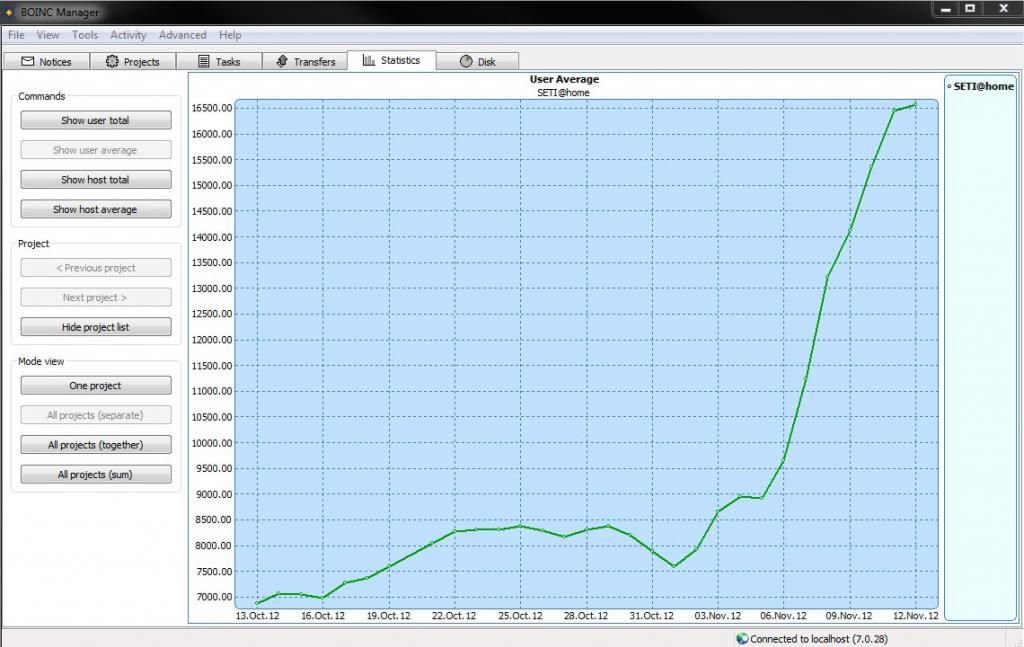
|
Previous 20 · Next 20

©2024 University of California
SETI@home and Astropulse are funded by grants from the National Science Foundation, NASA, and donations from SETI@home volunteers. AstroPulse is funded in part by the NSF through grant AST-0307956.