Optimize your GPU. Find the value the easy way.
Message boards :
Number crunching :
Optimize your GPU. Find the value the easy way.
Message board moderation
Previous · 1 . . . 6 · 7 · 8 · 9 · 10 · 11 · 12 . . . 13 · Next
| Author | Message |
|---|---|
 Sunny129 Sunny129  Send message Joined: 7 Nov 00 Posts: 190 Credit: 3,163,755 RAC: 0 
|
the <count>n</count> statement is the one that controls the number of tasks running in parallel, where n=1 corresponds to 1 task, n=0.5 corresponds to 2 tasks, n=0.33 corresponds to 3 tasks, and so on and so forth... hmm...it appears you have some room to push. i could have sworn that 3 simultaneous tasks would require more than 1GB of VRAM, but 2 simultaneous tasks on your GT 520 appear to be using only 466MB...i must be mixing up SETI w/ some other project as far as VRAM consumption is concerned. so i suppose you could try 3 simultaneous tasks to see if they finish in less than three times the run time of a single task by itself. 
ID: 1280880 ·  |
|
Grant (SSSF) Send message Joined: 19 Aug 99 Posts: 13727 Credit: 208,696,464 RAC: 304 
 |
so i suppose you could try 3 simultaneous tasks to see if they finish in less than three times the run time of a single task by itself. If you look at the numbers posted in this thread, you'll see that for most video cards 2 is the number. Only highend cards get any benefit from 3, on most cards you end up doing less work. Grant Darwin NT ID: 1280922 · |
|
Sunny129 Send message Joined: 7 Nov 00 Posts: 190 Credit: 3,163,755 RAC: 0
|
so i suppose you could try 3 simultaneous tasks to see if they finish in less than three times the run time of a single task by itself. yeah, that's what i originally thought and seemed to remember...then i saw that the SETI tasks weren't consuming as much VRAM as i thought they were. then i started to think about all the other projects i'm involved in, and figured i might be confusing SETI's VRAM requirements w/ that of another project...and so i started to second guess myself. but as i mentioned in a previous post, i was only able to run 2 Multibeam tasks at a time on either of my GTX 560 Ti's.
ID: 1280972 · |
John Thon  Send message Joined: 12 May 08 Posts: 18 Credit: 12,310,310 RAC: 34
 |
For those who use nVIDIA cards that have high temp readings you can adjust the cooling fan speed using the following software from nVIDIA: http://www.nvidia.com/object/nvidia-system-tools-6.08-driver-th.html This will not negate the use of 306.02 beta driver for you cards. Works great My cards went from 70c to 53c in a matter of min. Fan speed max is 70 %. John ID: 1281000 · |
Snowmain  Send message Joined: 17 Nov 05 Posts: 75 Credit: 30,681,449 RAC: 83

|
Or you could just download MSI Afterburner and design you own custom fanspeed vs. Gpu temp Curve. Max fan speed 100%. 
ID: 1281009 · |
|
John Thon Send message Joined: 12 May 08 Posts: 18 Credit: 12,310,310 RAC: 34
|
Or you could just download MSI Afterburner and design you own custom fanspeed vs. Gpu temp Curve. I do not have an MSI motherboard or MSI graphics card. Will it work on any system? Besides you need a graphics cards with CHL8318+uP6262 voltage regulators. John ID: 1281015 · |
|
Sunny129 Send message Joined: 7 Nov 00 Posts: 190 Credit: 3,163,755 RAC: 0
|
Or you could just download MSI Afterburner and design you own custom fanspeed vs. Gpu temp Curve. yes, it'll work on just about any system. nevertheless, some people occasionally have trouble with it, and have to resort to an alternative method of GPU monitoring. so thank you for posting a link to the nVidia System Tools w/ SEA Support, as i'm sure some folks will find it to be a viable alternative to MSI Afterburner.
ID: 1281018 · |
Cliff Harding  Send message Joined: 18 Aug 99 Posts: 1432 Credit: 110,967,840 RAC: 67
|
Attempted to run the app against a EVGA GTX460SE and got the following message: Starting automatic test: (x41g) 08 September 2012 - 13:55:21 Start, devices: 1, device count: 1 (1.00) ERROR: Unable to copy from: D:\My Documents\Downloads\BOINC\BOINC Tasks\x41g\ to: C:\Users\Cliff Harding\AppData\Roaming\eFMer\SetiPerformance, slot: 0 Aborted   I don't buy computers, I build them!! ID: 1281569 · |
shizaru  Send message Joined: 14 Jun 04 Posts: 1130 Credit: 1,967,904 RAC: 0 
|
@Snowmain Another awesome graph, thanx! One thing I noticed is it's around a dollar a Watt per year. Crude, but easy to remember:) ID: 1281613 · |
w1hue  Send message Joined: 4 Aug 00 Posts: 69 Credit: 5,492,898 RAC: 7
|
This brings up another question: Since there is no Lunatics NVIDIA GPU app for Astropulse (as of yet...), will my machine run GPU Astropulse WU's using the standard SETI app, or do I need to add something the the app_info file? And if so, what? The answer may be out there somewhere, but a search here and on the Lunatics site hasn't turned it up... Well, that does not appear to be the case as I received the following message: SETI@home: notice from server your app_info.xml file doesn't have a usable entry of AstroPulse V6 So obviously, I need to add entry(s) the the app_info file -- but what?? I think that I will start a new thread on this and see if anyone can help...  ID: 1281731 · |
|
Snowmain Send message Joined: 17 Nov 05 Posts: 75 Credit: 30,681,449 RAC: 83
|
@Snowmain Yup 1 to 1 ruffly when your power cost 12 cents a killo watt hour. Which I think is pritty average...right?(shrug) Anyhow your welcome :) Glad to do it. I pm'ed about 30 other members with unique video cards with links to this thread. edit: My power cost .1596 per killowatt hour. 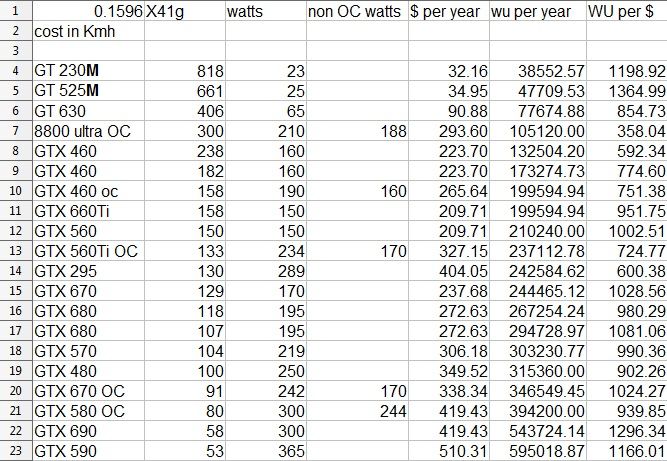
ID: 1281756 · |
|
Sunny129 Send message Joined: 7 Nov 00 Posts: 190 Credit: 3,163,755 RAC: 0
|
This brings up another question: Since there is no Lunatics NVIDIA GPU app for Astropulse (as of yet...), will my machine run GPU Astropulse WU's using the standard SETI app, or do I need to add something the the app_info file? And if so, what? The answer may be out there somewhere, but a search here and on the Lunatics site hasn't turned it up... yeah, i wasn't thinking about the fact that you were already running an app_info.xml to pass parameters to the nVidia Multibeam app. b/c you are employing an app_info.xml file, your host will only download work for the apps specified in the app_info.xml. so i stand corrected - you must have an entry for even the stock nVidia OpenCL Astropulse app since you're already using an app_info.xml. at any rate, i agree that its best to start a new thread since that's not the topic of this thread. that being said, if you just cut & paste the section of code i posted above into your app_info.xml, you should be good to go. i wouldn't worry about the <avg_ncpus>0.04</avg_ncpus> and <max_ncpus>0.2</max_ncpus> parameter values, as these have been pretty well established.. the only thing you need to manipulate is <count>. the executable of the app itself is the same despite my running Windows7 x64 and your running WinXP x32, so that doesn't need to be changed either.
ID: 1281757 · |
|
w1hue Send message Joined: 4 Aug 00 Posts: 69 Credit: 5,492,898 RAC: 7
|
that being said, if you just cut & paste the section of code i posted above into your app_info.xml, you should be good to go. i wouldn't worry about the <avg_ncpus>0.04</avg_ncpus> and <max_ncpus>0.2</max_ncpus> parameter values, as these have been pretty well established.. the only thing you need to manipulate is <count>. the executable of the app itself is the same despite my running Windows7 x64 and your running WinXP x32, so that doesn't need to be changed either. OK - thanks! The executable name is not the same as in my oldApp_backup folder, but I'll leave it as copied from your post and see what happens. I set <count> to 1.0 -- still not clear if 0.5 will work with the stock app, but I can experiment with that later. I added <flops>34000000000</flops> after <max_ncpus>0.2</max_ncpus> as that resulted in a reasonable time estimate for the setiathome_enhanced WUs. ID: 1281772 · |
|
pester500 Send message Joined: 6 Jul 04 Posts: 2 Credit: 52,951,231 RAC: 0
|
This is a great app! I definitely noticed about a 6K bump in my RAC after adjusting my app_info.xml. My config: Win7 64-bit, Core i7-2600K @ 4.2 GHz 2x GeForce GTX 570 (no OC) Output from x41g: Starting automatic test: (x41g) 10 September 2012 - 00:22:06 Start, devices: 1, device count: 1 (1.00) --------------------------------------------------------------------------- Results: Device: 0, device count: 1, average time / count: 127, average time on device: 127 Seconds (2 Minutes, 7 Seconds) Next :--------------------------------------------------------------------------- 10 September 2012 - 00:24:15 Start, devices: 1, device count: 2 (0.50) --------------------------------------------------------------------------- Results: Device: 0, device count: 2, average time / count: 218, average time on device: 109 Seconds (1 Minutes, 49 Seconds) Next :--------------------------------------------------------------------------- 10 September 2012 - 00:27:56 Start, devices: 1, device count: 3 (0.33) --------------------------------------------------------------------------- Results: Device: 0, device count: 3, average time / count: 349, average time on device: 116 Seconds (1 Minutes, 56 Seconds) >> The best average time found: 109 Seconds (1 Minutes, 49 Seconds), with count: 0.50 (2) ID: 1282147 · |
|
Doc's Brains Send message Joined: 11 Jun 12 Posts: 26 Credit: 752,217 RAC: 0 
|
Just a quick question, I have just updated my comps to crunch with Lunatics programs, and I am wondering if the program that is being talked about in this thread would be a good thing for me to use as well. I have an I5 laptop with the 525M Nvidia GPU? Is there a similar program that I can use on my older P4's( I have 2) that have Nvidia's 6200 GPU's installed in them? Any response will be greatly appreciated. Cheers! ID: 1282440 · |
|
Doc's Brains Send message Joined: 11 Jun 12 Posts: 26 Credit: 752,217 RAC: 0
|
Please disregard the previous post \i made with regards to using the program, I have ran the program after reading further, and here are my results; Toshiba Satellite L770 Intel I5 2450m @ 2.5Ghz Sandy Bridge NVidia GeForce GT 525M Driver version nvlddmkm 8.17.13.142(Force Ware 301.42 Windows7 64 bit GPU clock; 475Mhz, Memory; 900Mhz, Shader 950Mhz Starting automatic test: (x41g) 10 September 2012 - 18:17:04 Start, devices: 1, device count: 1 (1.00) --------------------------------------------------------------------------- Results: Device: 0, device count: 1, average time / count: 981, average time on device: 981 Seconds (16 Minutes, 21 Seconds) Next :--------------------------------------------------------------------------- 10 September 2012 - 18:33:28 Start, devices: 1, device count: 2 (0.50) --------------------------------------------------------------------------- Results: Device: 0, device count: 2, average time / count: 1560, average time on device: 780 Seconds (13 Minutes, 0 Seconds) Next :--------------------------------------------------------------------------- 10 September 2012 - 18:59:34 Start, devices: 1, device count: 3 (0.33) --------------------------------------------------------------------------- Results: Device: 0, device count: 3, average time / count: 2338, average time on device: 779 Seconds (12 Minutes, 59 Seconds) >> The best average time found: 780 Seconds (13 Minutes, 0 Seconds), with count: 0.50 (2) With the testing now done, I know it's in my best interest to allow a device count of 2. My question now is how do I take this information and utilize it, in other words, how do I change the GPU to allow 2 instances to run at the same time? Is there a link or 2 that I can read, that will help me learn how to do this? Reading prior posts in this thread, some coding is probably involved, and while I don't know how to do this on my own, I can learn real fast, cut and paste with the best, and can follow directory instructions without getting lost. I know I have been needy in the last week or so, asking for help to accomplish these tasks, but I feel we're almost at an end of what I can do in to improve my computers behaviour when completing S@H tasks. Once again, Thanks for your kind words of knowledge and your willingness to share them with me, it really is appreciated. Cheers! ID: 1282473 · |
BilBg  Send message Joined: 27 May 07 Posts: 3720 Credit: 9,385,827 RAC: 0 
|
Go again at the link/page where you get Seti Performance There is short explanation, read after: "Now that I found out that a count of 2 (0.5) is the best setting, what now? ..." Â   - ALF - "Find out what you don't do well ..... then don't do it!" :) - ALF - "Find out what you don't do well ..... then don't do it!" :)Â ID: 1282512 · |
|
BilBg Send message Joined: 27 May 07 Posts: 3720 Credit: 9,385,827 RAC: 0
|
ATI tests using SetiPerformance 1.3 I think this is the first report for ATI tests (I managed to make it run both MB and AP ATI tests) If you want to get this combined experimental package (all files from the original + ATI tests added by me) use the link bellow: (I hope Fred will not be angry that I supply this) SetiPerformance_32_64_1_3__ATI-added-by-BilBg.7z - 17 MB: http://www.datafilehost.com/download-04a5fb4f.html ---===---===--- Before you run the tests: * A) Look in config.xml and change the 'parameter' for MB/AP if you wish. As you can see I use: -period_iterations_num 20 (which is the default in the app_info.xml created by Lunatics installer) -unroll 3 (which I choose for my AMD Radeon HD 6570 which have 'Number of compute units: 6'; if no -unroll is specified the .exe by (internal) default uses -unroll 2) <parameter>%20--device%20%device%20-instances_per_device%204%20-period_iterations_num%2020%20</parameter> <parameter>%20--device%20%device%20-unroll%203%20</parameter> (The additional 'Space' char %20 at the end is intentional - to avoid error if you add something in the 'Parameters' field (in the program window) and forget to add initial Space ' ' there) If you want e.g. -period_iterations_num 44 -unroll 11 1) You may edit to: <parameter>%20--device%20%device%20-instances_per_device%204%20-period_iterations_num%2044%20</parameter> <parameter>%20--device%20%device%20-unroll%2011%20</parameter> 2) Or you may delete to: <parameter>%20--device%20%device%20-instances_per_device%204%20</parameter> <parameter>%20--device%20%device%20</parameter> ... and paste the options/parameters/cmdline: -period_iterations_num 44 -unroll 11in the 'Parameters' field (additional spaces are good, no space is bad). (I think the .exe will just ignore any cmdline parameter it do not understand, e.g. MB app will ignore -unroll) * B) For AP ATI tests: to get better/real timings - use 'bin' files compiled for your GPU: - you need to do the following only once for a given GPU: Start the AP test Wait ~1 minute (or until you see high GPU load) run Open Slots.cmd go to slot0 copy all (2) 'bin' files from slot0 to: ...\SetiPerformance_32_64_1_3__ATI-added-by-BilBg\zip\AP6_win_x86_SSE2_OpenCL_ATI_r1316\ [Cancel] the test (Now you can start SetiPerformance and [Test ...] again many times - the AP app will now use the prepared 'bin' files. You can have a mix of 'bin' files (in zip\AP6_win_x86_SSE2_OpenCL_ATI_r1316\) compiled for different GPUs. The work_unit.sah file is there only to fool SetiPerformance to run ;) The real AP WU is in.dat ) ! Don't forget to exit BOINC before tests or at least Snooze GPU ! ---===---===--- AP6_win_x86_SSE2_OpenCL_ATI_r1316:  For my AMD Radeon HD 6570 there is no difference in heat generation for 1...3 AP ATI tasks:  MB6_win_x86_SSE3_OpenCL_ATi_HD5_r390:  Judging from the times and lag and possible errors I decided to try (in BOINC/SETI/app_info.xml): For AP ATI: <count>0.48</count> For MB ATI: <count>0.51</count> This way BOINC will run either: 1 MB, MB+AP, AP+AP But these variations in usage cause DCF to fluctuate 1.0 ... 2.8 (runs this way ~12 hours now in MB+AP 'variant') *** Test logs (AMD Radeon HD 6570, Win XP32, Catalyst 11.12): For AP ATI: Starting automatic test: (ap6_win_x86_sse2_opencl_ati_r1316) 10 September 2012 - 20:08:27 Start, devices: 1, device count: 1 (1.00) 10 September 2012 - 20:08:27 Set: ap6_win_x86_sse2_opencl_ati_r1316 , Exe: ap6_win_x86_sse2_opencl_ati_r1316.exe , Parameters: --device %device -unroll 3 10 September 2012 - 20:21:06 Runtime: Device: 0, count: 0, 758 seconds 10 September 2012 - 20:21:06 Device: 0, Count: 0, finished. --------------------------------------------------------------------------- Results: Device: 0, device count: 1, average time / count: 758, average time on device: 758 Seconds (12 Minutes, 38 Seconds) Next :--------------------------------------------------------------------------- 10 September 2012 - 20:21:06 Start, devices: 1, device count: 2 (0.50) 10 September 2012 - 20:21:06 Set: ap6_win_x86_sse2_opencl_ati_r1316 , Exe: ap6_win_x86_sse2_opencl_ati_r1316.exe , Parameters: --device %device -unroll 3 10 September 2012 - 20:45:20 Runtime: Device: 0, count: 0, 1452 seconds 10 September 2012 - 20:45:20 Device: 0, Count: 0, finished. 10 September 2012 - 20:45:26 Runtime: Device: 0, count: 1, 1458 seconds 10 September 2012 - 20:45:26 Device: 0, Count: 1, finished. --------------------------------------------------------------------------- Results: Device: 0, device count: 2, average time / count: 1455, average time on device: 727 Seconds (12 Minutes, 7 Seconds) Next :--------------------------------------------------------------------------- 10 September 2012 - 20:45:26 Start, devices: 1, device count: 3 (0.33) 10 September 2012 - 20:45:26 Set: ap6_win_x86_sse2_opencl_ati_r1316 , Exe: ap6_win_x86_sse2_opencl_ati_r1316.exe , Parameters: --device %device -unroll 3 10 September 2012 - 21:21:24 Runtime: Device: 0, count: 2, 2156 seconds 10 September 2012 - 21:21:24 Device: 0, Count: 2, finished. 10 September 2012 - 21:21:32 Runtime: Device: 0, count: 1, 2164 seconds 10 September 2012 - 21:21:32 Device: 0, Count: 1, finished. 10 September 2012 - 21:21:33 Runtime: Device: 0, count: 0, 2165 seconds 10 September 2012 - 21:21:33 Device: 0, Count: 0, finished. --------------------------------------------------------------------------- Results: Device: 0, device count: 3, average time / count: 2161, average time on device: 720 Seconds (12 Minutes, 0 Seconds) Next :--------------------------------------------------------------------------- 10 September 2012 - 21:21:34 Start, devices: 1, device count: 4 (0.25) 10 September 2012 - 21:21:34 Set: ap6_win_x86_sse2_opencl_ati_r1316 , Exe: ap6_win_x86_sse2_opencl_ati_r1316.exe , Parameters: --device %device -unroll 3 10 September 2012 - 22:08:26 Runtime: Device: 0, count: 1, 2809 seconds 10 September 2012 - 22:08:26 Device: 0, Count: 1, finished. 10 September 2012 - 22:08:36 Runtime: Device: 0, count: 3, 2819 seconds 10 September 2012 - 22:08:36 Device: 0, Count: 3, finished. 10 September 2012 - 22:08:47 Runtime: Device: 0, count: 0, 2830 seconds 10 September 2012 - 22:08:47 Device: 0, Count: 0, finished. 10 September 2012 - 22:09:00 Runtime: Device: 0, count: 2, 2843 seconds 10 September 2012 - 22:09:00 Device: 0, Count: 2, finished. --------------------------------------------------------------------------- Results: Device: 0, device count: 4, average time / count: 2825, average time on device: 706 Seconds (11 Minutes, 46 Seconds) >> The best average time found: 720 Seconds (12 Minutes, 0 Seconds), with count: 0.33 (3) For MB ATI: Starting automatic test: (mb6_win_x86_sse3_opencl_ati_hd5_r390) 10 September 2012 - 22:47:32 Start, devices: 1, device count: 1 (1.00) 10 September 2012 - 22:47:32 Set: mb6_win_x86_sse3_opencl_ati_hd5_r390 , Exe: mb6_win_x86_sse3_opencl_ati_hd5_r390.exe , Parameters: --device %device -instances_per_device 4 -period_iterations_num 20 10 September 2012 - 23:04:00 Runtime: Device: 0, count: 0, 986 seconds 10 September 2012 - 23:04:00 Device: 0, Count: 0, finished. --------------------------------------------------------------------------- Results: Device: 0, device count: 1, average time / count: 986, average time on device: 986 Seconds (16 Minutes, 26 Seconds) Next :--------------------------------------------------------------------------- 10 September 2012 - 23:04:01 Start, devices: 1, device count: 2 (0.50) 10 September 2012 - 23:04:01 Set: mb6_win_x86_sse3_opencl_ati_hd5_r390 , Exe: mb6_win_x86_sse3_opencl_ati_hd5_r390.exe , Parameters: --device %device -instances_per_device 4 -period_iterations_num 20 10 September 2012 - 23:36:29 Runtime: Device: 0, count: 0, 1947 seconds 10 September 2012 - 23:36:29 Device: 0, Count: 0, finished. 10 September 2012 - 23:36:30 Runtime: Device: 0, count: 1, 1948 seconds 10 September 2012 - 23:36:30 Device: 0, Count: 1, finished. --------------------------------------------------------------------------- Results: Device: 0, device count: 2, average time / count: 1947, average time on device: 973 Seconds (16 Minutes, 13 Seconds) Next :--------------------------------------------------------------------------- 10 September 2012 - 23:36:32 Start, devices: 1, device count: 3 (0.33) 10 September 2012 - 23:36:32 Set: mb6_win_x86_sse3_opencl_ati_hd5_r390 , Exe: mb6_win_x86_sse3_opencl_ati_hd5_r390.exe , Parameters: --device %device -instances_per_device 4 -period_iterations_num 20 10 September 2012 - 23:39:06 Runtime: Device: 0, count: 1, 153 seconds 10 September 2012 - 23:39:06 ERROR: Device: 0, Count: 1, finished. *** Starting test: (mb6_win_x86_sse3_opencl_ati_hd5_r390) 11 September 2012 - 02:02:31 Start, devices: 1, device count: 3 (0.33) 11 September 2012 - 02:02:31 Set: mb6_win_x86_sse3_opencl_ati_hd5_r390 , Exe: mb6_win_x86_sse3_opencl_ati_hd5_r390.exe , Parameters: --device %device -instances_per_device 4 -period_iterations_num 20 11 September 2012 - 02:05:13 Runtime: Device: 0, count: 2, 153 seconds 11 September 2012 - 02:05:13 ERROR: Device: 0, Count: 2, finished. 11 September 2012 - 02:05:13 Runtime: Device: 0, count: 0, 158 seconds 11 September 2012 - 02:05:13 ERROR: Device: 0, Count: 0, finished. *** 3 MB tasks on my AMD Radeon HD 6570 cause ERROR (1 or 2 of the r390 processes really exited (as shown in Process Explorer). The remaining run very slow (monitor <prog>0.XXXX</prog> in state.sah), but I see high >90% GPU load (in SIV) and I feel lag. GPU temp (in TThrottle) lower than usual for MB (44°C instead of ~50°C) VRAM usage (shown by old version of ATI MemoryViewer) is too low (<50 MB, normal VRAM usage for one r390 task is 220-250 MB) I aborted the test after ~1 hour by [Cancel] button. )  - ALF - "Find out what you don't do well ..... then don't do it!" :) ID: 1282687 · |
Mike   Send message Joined: 17 Feb 01 Posts: 34255 Credit: 79,922,639 RAC: 80 
|
Will have a look as soon i got some time. Thank you. With each crime and every kindness we birth our future. ID: 1282697 · |
|
Sunny129 Send message Joined: 7 Nov 00 Posts: 190 Credit: 3,163,755 RAC: 0
|
[scratches head]hmmm....[/scratches head]
ID: 1282702 · |

©2024 University of California
SETI@home and Astropulse are funded by grants from the National Science Foundation, NASA, and donations from SETI@home volunteers. AstroPulse is funded in part by the NSF through grant AST-0307956.