Optimize your GPU. Find the value the easy way.
Message boards :
Number crunching :
Optimize your GPU. Find the value the easy way.
Message board moderation
Previous · 1 . . . 5 · 6 · 7 · 8 · 9 · 10 · 11 . . . 13 · Next
| Author | Message |
|---|---|
 Arvid Almstrom Arvid Almstrom  Send message Joined: 23 Mar 00 Posts: 98 Credit: 137,331,372 RAC: 0 
|
Here are my tests running on a 570 with different CUDA apps. For some reason running 4 tasks didn't complete on either the 41z cuda 3.2 or 41z cuda 4.2. Starting automatic test: (x41x_winx64_cuda41) Device: 0, device count: 1, average time / count: 127, average time on device: 127 Seconds (2 Minutes, 7 Seconds) Device: 0, device count: 2, average time / count: 203, average time on device: 101 Seconds (1 Minutes, 41 Seconds) Device: 0, device count: 3, average time / count: 290, average time on device: 96 Seconds (1 Minutes, 36 Seconds) Starting automatic test: (x41x_winx64_cuda42) Device: 0, device count: 1, average time / count: 124, average time on device: 124 Seconds (2 Minutes, 4 Seconds) Device: 0, device count: 2, average time / count: 198, average time on device: 99 Seconds (1 Minutes, 39 Seconds) Device: 0, device count: 3, average time / count: 285, average time on device: 95 Seconds (1 Minutes, 35 Seconds) Device: 0, device count: 4, average time / count: 469, average time on device: 117 Seconds (1 Minutes, 57 Seconds) Starting automatic test: (x41z_winx64_cuda42) Device: 0, device count: 1, average time / count: 128, average time on device: 128 Seconds (2 Minutes, 8 Seconds) Device: 0, device count: 2, average time / count: 198, average time on device: 99 Seconds (1 Minutes, 39 Seconds) Device: 0, device count: 3, average time / count: 284, average time on device: 94 Seconds (1 Minutes, 34 Seconds) Arvid Arvid Almstrom 
ID: 1280069 ·  |
jason_gee  Send message Joined: 24 Nov 06 Posts: 7489 Credit: 91,093,184 RAC: 0
|
... Textbook parallelism 'bathtub curve' , that's what you're looking for. [ For completion be sure to check 4 raises due to contention cost with z as well :), suspicion is that Fermi's dual DMA engines need 2 streams plus one for latency hiding for maximal use (on Vista/Win7 anyway), though there are other bottlenecks in play.] "Living by the wisdom of computer science doesn't sound so bad after all. And unlike most advice, it's backed up by proofs." -- Algorithms to live by: The computer science of human decisions. ID: 1280099 · |
spitfire_mk_2  Send message Joined: 14 Apr 00 Posts: 563 Credit: 27,306,885 RAC: 0 
|
Tool version 1.2 Card: GTX 460 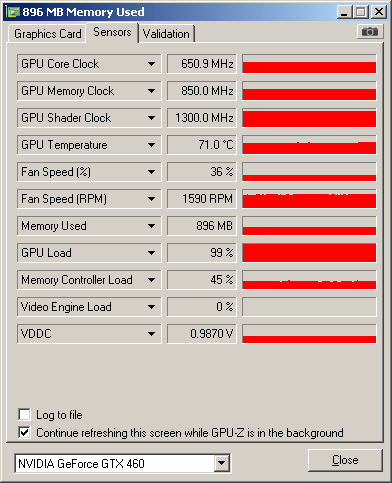 Results: Starting automatic test: (x41g) 04 September 2012 - 21:42:57 Start, devices: 1, device count: 1 (1.00) 04 September 2012 - 21:47:27 Runtime: Device: 0, count: 0, 265 seconds 04 September 2012 - 21:47:27 Device: 0, Count: 0, finished. Ready --------------------------------------------------------------------- Results: Device: 0, device count: 1, average time / count: 265, average time on device: 265 Seconds (4 Minutes, 25 Seconds) Next --------------------------------------------------------------------- 04 September 2012 - 21:47:29 Start, devices: 1, device count: 2 (0.50) 04 September 2012 - 21:56:02 Runtime: Device: 0, count: 0, 510 seconds 04 September 2012 - 21:56:02 Device: 0, Count: 0, finished. 04 September 2012 - 21:56:12 Runtime: Device: 0, count: 1, 520 seconds 04 September 2012 - 21:56:12 Device: 0, Count: 1, finished. Ready --------------------------------------------------------------------- Results: Device: 0, device count: 2, average time / count: 515, average time on device: 257 Seconds (4 Minutes, 17 Seconds) Next --------------------------------------------------------------------- 04 September 2012 - 21:56:13 Start, devices: 1, device count: 3 (0.33) 04 September 2012 - 22:08:10 Runtime: Device: 0, count: 0, 711 seconds 04 September 2012 - 22:08:10 Device: 0, Count: 0, finished. 04 September 2012 - 22:08:14 Runtime: Device: 0, count: 2, 715 seconds 04 September 2012 - 22:08:14 Device: 0, Count: 2, finished. 04 September 2012 - 22:08:17 Runtime: Device: 0, count: 1, 718 seconds 04 September 2012 - 22:08:17 Device: 0, Count: 1, finished. Ready --------------------------------------------------------------------- Results: Device: 0, device count: 3, average time / count: 714, average time on device: 238 Seconds (3 Minutes, 58 Seconds) Next --------------------------------------------------------------------- 04 September 2012 - 22:08:19 Start, devices: 1, device count: 4 (0.25) 04 September 2012 - 22:24:12 Runtime: Device: 0, count: 0, 945 seconds 04 September 2012 - 22:24:12 Device: 0, Count: 0, finished. 04 September 2012 - 22:24:20 Runtime: Device: 0, count: 1, 953 seconds 04 September 2012 - 22:24:20 Device: 0, Count: 1, finished. 04 September 2012 - 22:24:22 Runtime: Device: 0, count: 2, 955 seconds 04 September 2012 - 22:24:22 Device: 0, Count: 2, finished. 04 September 2012 - 22:24:22 Runtime: Device: 0, count: 3, 955 seconds 04 September 2012 - 22:24:22 Device: 0, Count: 3, finished. Ready --------------------------------------------------------------------- Results: Device: 0, device count: 4, average time / count: 952, average time on device: 238 Seconds (3 Minutes, 58 Seconds) The best average time found: 238 Seconds (3 Minutes, 58 Seconds), with count: 0.33 (3) 
ID: 1280114 · |
|
jason_gee Send message Joined: 24 Nov 06 Posts: 7489 Credit: 91,093,184 RAC: 0
|
Tool version 1.2 I was called that once in high school. "Living by the wisdom of computer science doesn't sound so bad after all. And unlike most advice, it's backed up by proofs." -- Algorithms to live by: The computer science of human decisions. ID: 1280150 · |
Wiggo  Send message Joined: 24 Jan 00 Posts: 34744 Credit: 261,360,520 RAC: 489

|
Tool version 1.2 Sorry, I know that I shouldn't post while I'm trying to get pi...., ah..., blind or getting off topic but this just leaves me with questions to ask so does that mean that you have, A/ Already been categorised? B/ At such an early age? C/ Also been identified as the 2nd revision of your model? As far as I know they're still trying to figure me out on A. :D Cheers? ID: 1280158 · |
S@NL - eFMer - efmer.com/boinc  Send message Joined: 7 Jun 99 Posts: 512 Credit: 148,746,305 RAC: 0
|
Tool version 1.2 This value is way off other readings of 182 and 157oC the other cards are in the line of expectations. 460/560/660 TThrottle Control your temperatures. BoincTasks The best way to view BOINC. Anza Borrego Desert hiking. ID: 1280159 · |
|
S@NL - eFMer - efmer.com/boinc Send message Joined: 7 Jun 99 Posts: 512 Credit: 148,746,305 RAC: 0
|
V 1.3 Some bug fixes and a new workunits folder. The check "Use all xx workunits" will use all WU in the "workunits" folder. WARNING: A test with all the workunits may take a while..... TThrottle Control your temperatures. BoincTasks The best way to view BOINC. Anza Borrego Desert hiking. ID: 1280212 · |
|
John Send message Joined: 21 May 99 Posts: 51 Credit: 5,667,907 RAC: 0
|
thanks for the info. Full day of running about 600 or more completed and only those 2 errors so far. rac over 4000 CPU has started crunching late last night. so far so good at 3 wu each Gtx 670 gtx 470 ( win 7 64 bit) Nvidia 306.02 
ID: 1280218 · |
shizaru  Send message Joined: 14 Jun 04 Posts: 1130 Credit: 1,967,904 RAC: 0 
|
Ok, not only was this tool an awesome idea but since I was able to run it without nagging anybody for help, proves you made it idiot-proof too:) Double mahalo! And now a quote from Sten, which I've been dying to use: "Let's not forget The Mighty Ion!" Starting automatic test: (x41g) 05 September 2012 - 13:41:27 Start, devices: 1, device count: 1 (1.00) 05 September 2012 - 14:20:10 Runtime: Device: 0, count: 0, 2319 seconds 05 September 2012 - 14:20:10 Device: 0, Count: 0, finished. Ready --------------------------------------------------------------------- Results: Device: 0, device count: 1, average time / count: 2319, average time on device: 2319 Seconds (38 Minutes, 39 Seconds) Next --------------------------------------------------------------------- 05 September 2012 - 14:20:11 Start, devices: 1, device count: 2 (0.50) 05 September 2012 - 15:29:07 Runtime: Device: 0, count: 0, 4132 seconds 05 September 2012 - 15:29:07 Device: 0, Count: 0, finished. 05 September 2012 - 15:29:13 Runtime: Device: 0, count: 1, 4138 seconds 05 September 2012 - 15:29:13 Device: 0, Count: 1, finished. Ready --------------------------------------------------------------------- Results: Device: 0, device count: 2, average time / count: 4135, average time on device: 2067 Seconds (34 Minutes, 27 Seconds) Next --------------------------------------------------------------------- 05 September 2012 - 15:29:15 Start, devices: 1, device count: 3 (0.33) Local time is 19:59 so after 4hrs+ I think I'm going to give up on count 3:) I also think I'm the only person to need the 6hr option in the graph! I know it's not showing but don't worry... GPU-Z crashed too when running 3 tasks. Yeah this is the second run. I've been at this all day!  Edit: Alt + Prt Sc wouldn't work either, it just saw "behind" the Graph window and took a picture of a small part of my desktop:) Anyway, thanx for thinking to run this on your laptop. I NEVER would have thought to run it otherwise. Windows 7 32-bit, Second Generation nVidia ION 512MB driver 270.61 35GFLOPS peak. This is the GT218 chip also found in the G210M, 305M, 310M and 315M ID: 1280323 · |
w1hue  Send message Joined: 4 Aug 00 Posts: 69 Credit: 5,492,898 RAC: 7
|
Ok, not only was this tool an awesome idea but since I was able to run it without nagging anybody for help, proves you made it idiot-proof too:) Not entirely ... I have not been able to get it to run. Apparently I am the only one in the known universe that hasn't had success, so I must be a super idiot!  ID: 1280451 · |
|
John Send message Joined: 21 May 99 Posts: 51 Credit: 5,667,907 RAC: 0
|
made it thur a day of server down 270 + tasks reported when server came up. with plenty in cache. First time ever. I also go a few astopusle wu ( 155 min runtimes once cpu freed up) Let the good times roll.
ID: 1280475 · |
|
shizaru Send message Joined: 14 Jun 04 Posts: 1130 Credit: 1,967,904 RAC: 0
|
...Apparently I am the only one in the known universe that hasn't had success, so I must be a super idiot! Ok, I had a quick look at everything you posted, your PC with the 520 and even the front page of your website and: a) I'm not buying the whole "caveman" thing:) b) I'm no Lunatics expert but maybe it's because you haven't installed the apps for CPU? It could be you have, and just haven't returned any results yet but CPU lunatics isn't showing up on the application details page of your 520 PC. Edit: ...machine ID 'lepc'...Not importartant but just so you know, the names of your PCs (and a bunch of other more personal info like IP addresses and other stuff) are only shown to you. In other words, no-one else can see the names of your PCs even if you wanted them to:) ID: 1280517 · |
Ralf02061973  Send message Joined: 24 Jul 00 Posts: 54 Credit: 9,983,656 RAC: 8 
|
@Snowmain that is a very interesting list ;) thanx in the next some weeks my Nvidia-GT630 get a new friend that is not in the list. im courious about the WU's/$ :D greetings ralf Boinc runs here on: Intel i7-3770K + IntelHD4000 Android-Stick-ARM-Cotex-A17 Sony-Z5C-ARM-Cortex-A53/A57 Nvidia GT-630 / Nvidia GTX-750Ti ID: 1280558 · |
|
w1hue Send message Joined: 4 Aug 00 Posts: 69 Credit: 5,492,898 RAC: 7
|
b) I'm no Lunatics expert but maybe it's because you haven't installed the apps for CPU? It could be you have, and just haven't returned any results yet but CPU lunatics isn't showing up on the application details page of your 520 PC. Well, no, I haven't installed the Lunatics apps for the CPU -- does that matter? (I guess I could install them and see what happens...) I'm running WU's from projects that don't support GPU's in the CPU, but not any from projects that support the GT 520. I'm currently running SETI, Einstein and Milkyway WU's in the 520 (and NOT in the CPU). This brings up another question: Since there is no Lunatics NVIDIA GPU app for Astropulse (as of yet...), will my machine run GPU Astropulse WU's using the standard SETI app, or do I need to add something the the app_info file? And if so, what? The answer may be out there somewhere, but a search here and on the Lunatics site hasn't turned it up...  ID: 1280804 · |
Snowmain  Send message Joined: 17 Nov 05 Posts: 75 Credit: 30,681,449 RAC: 83

|
@ The Chosen.....and everybody else. 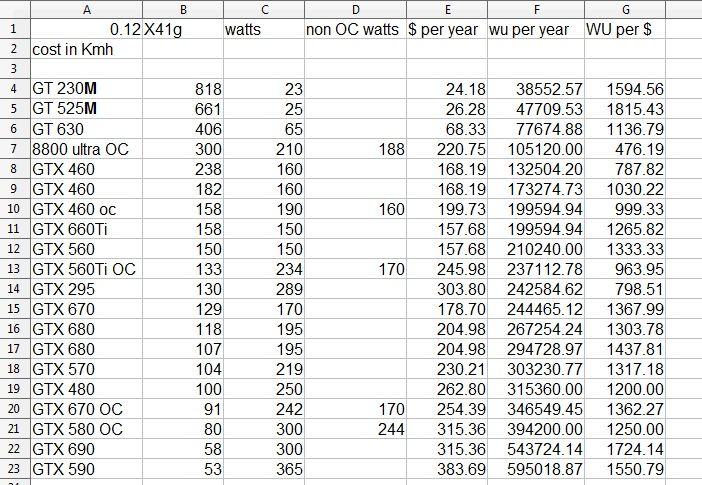 For my 2 cents the 229$ on the gtx 570 is the price performance Delta. My hope is that Sept 16th when the newest GTX 650 and 660 come out it will push down the price of gtx 570. Here's hoping. Finding power consumption #'s on the mobile processors was very difficult. Since the likelyhood of them being used is so low when I foujnd a number I didn't look any further...so they very well could be wrong( as any of these numbers could be wrong). 
ID: 1280834 · |
Sunny129  Send message Joined: 7 Nov 00 Posts: 190 Credit: 3,163,755 RAC: 0
|
This brings up another question: Since there is no Lunatics NVIDIA GPU app for Astropulse (as of yet...), will my machine run GPU Astropulse WU's using the standard SETI app, or do I need to add something the the app_info file? And if so, what? The answer may be out there somewhere, but a search here and on the Lunatics site hasn't turned it up... yes, once you enable AP tasks via your web preferences, your host should eventually download the stock nVidia OpenCL Astropulse binaries, and tasks will of course follow when they become available. you really only need an entry for it in the app_info.xml if you want to run multiple tasks in parallel/increase GPU utilization/decrease CPU utilization/mitigate GUI lag/etc. 
ID: 1280858 · |
|
w1hue Send message Joined: 4 Aug 00 Posts: 69 Credit: 5,492,898 RAC: 7
|
yes, once you enable AP tasks via your web preferences, your host should eventually download the stock nVidia OpenCL Astropulse binaries, and tasks will of course follow when they become available. Thanks for the reply. The stock binaries haven't appeared yet, but maybe I need to de-select AP, update, and then re-select AP. you really only need an entry for it in the app_info.xml if you want to run multiple tasks in parallel/increase GPU utilization/decrease CPU utilization/mitigate GUI lag/etc. This brings up another question -- where can I find info on what all can be done via settings in the app_info.xml file??? Can multiple stock AP tasks be executed in the GPU? I didn't think that was possible... ID: 1280862 · |
John Thon  Send message Joined: 12 May 08 Posts: 18 Credit: 12,310,310 RAC: 34
 |
not getting any WU's at all, are we on stand-by or something? and! how does the work: <avg_ncpus>0.040000</avg_ncpus> <max_ncpus>0.040000</max_ncpus> ID: 1280865 · |
|
Sunny129 Send message Joined: 7 Nov 00 Posts: 190 Credit: 3,163,755 RAC: 0
|
yes, once you enable AP tasks via your web preferences, your host should eventually download the stock nVidia OpenCL Astropulse binaries, and tasks will of course follow when they become available. perhaps it isn't supposed to download the executable and the associated files until new AP tasks are actually ready to be sent to your host...i really don't know. i would try manually updating the project from within BOINC before i try deselecting and re-selecting AP tasks in the web preferences. worst case it tells you that AP tasks aren't available at this time, and you'll get the binaries when tasks become available. you really only need an entry for it in the app_info.xml if you want to run multiple tasks in parallel/increase GPU utilization/decrease CPU utilization/mitigate GUI lag/etc. come to think of it, i'm not entirely sure if it would even be worth it to try to run more than a single task at a time on a GT 520. your card may have enough VRAM to run more than one task at a time, but a single task just might come close to maxing out your GPU utilization. really there's only one way to find out - run a single AP task, and then try two at a time. if they finish in less than twice the run time of the task that ran by itself, then your card can benefit from multiple tasks at once. rinse and repeat...although i can tell you right away that the 1GB of VRAM on GPUs like yours (and even my otherwise much more powerful GTX 560 Ti's) will not be enough to run 3 tasks in parallel...not without over-utilizing VRAM and increasing run times. at any rate, here's how the AP nVidia section of my app_info.xml reads: <app_info> <app> <name>astropulse_v6</name> </app> <file_info> <name>AP6_win_x86_SSE2_OpenCL_NV_r1316.exe</name> <executable/> </file_info> <app_version> <app_name>astropulse_v6</app_name> <version_num>604</version_num> <avg_ncpus>0.04</avg_ncpus> <max_ncpus>0.2</max_ncpus> <plan_class>cuda_fermi</plan_class> <cmdline></cmdline> <coproc> <type>CUDA</type> <count>0.5</count> </coproc> <file_ref> <file_name>AP6_win_x86_SSE2_OpenCL_NV_r1316.exe</file_name> <main_program/> </file_ref> </app_version> </app_info> the <count>n</count> statement is the one that controls the number of tasks running in parallel, where n=1 corresponds to 1 task, n=0.5 corresponds to 2 tasks, n=0.33 corresponds to 3 tasks, and so on and so forth...
ID: 1280870 · |
|
w1hue Send message Joined: 4 Aug 00 Posts: 69 Credit: 5,492,898 RAC: 7
|
the <count>n</count> statement is the one that controls the number of tasks running in parallel, where n=1 corresponds to 1 task, n=0.5 corresponds to 2 tasks, n=0.33 corresponds to 3 tasks, and so on and so forth... Well, I know about <count> and I finally found some info on <flops>, but there is stuff in there that I don't entirely understand (for example, what's <avg_ncpus> mean?). It would be nice if the parameters in the app_info file were documented someplace... I am currently running two SETI tasks in the 520 -- they appear to complete in somewhat less than twice the time for a single task, so It looks like I am coming out ahead. GPU-Z shows 99% GPU Load, 74% Memory Controller Load, 466 MB Memory Used and GPU Temp of 79 deg C when running two SETI enhanced tasks in parallel. GPU Load was 92 - 93% for a single task. Interesting that even under 99% GPU Load, I don't see any effect on the display with GPU tasks running. But it would be nice if I could get Fred's test program to run on my machine... ID: 1280878 · |

©2024 University of California
SETI@home and Astropulse are funded by grants from the National Science Foundation, NASA, and donations from SETI@home volunteers. AstroPulse is funded in part by the NSF through grant AST-0307956.