Multi core greater than 80 core
Message boards :
Number crunching :
Multi core greater than 80 core
Message board moderation
Previous · 1 · 2 · 3 · 4 · 5 · 6 . . . 8 · Next
| Author | Message |
|---|---|
|
Bry B Send message Joined: 3 Apr 99 Posts: 53 Credit: 832,165 RAC: 0 
|
I did just fire up with Superdome 2. Which is 64 socket and 256LP IA-64. I am running about 12% resources and its not scaling so far like the smaller 4 socket. 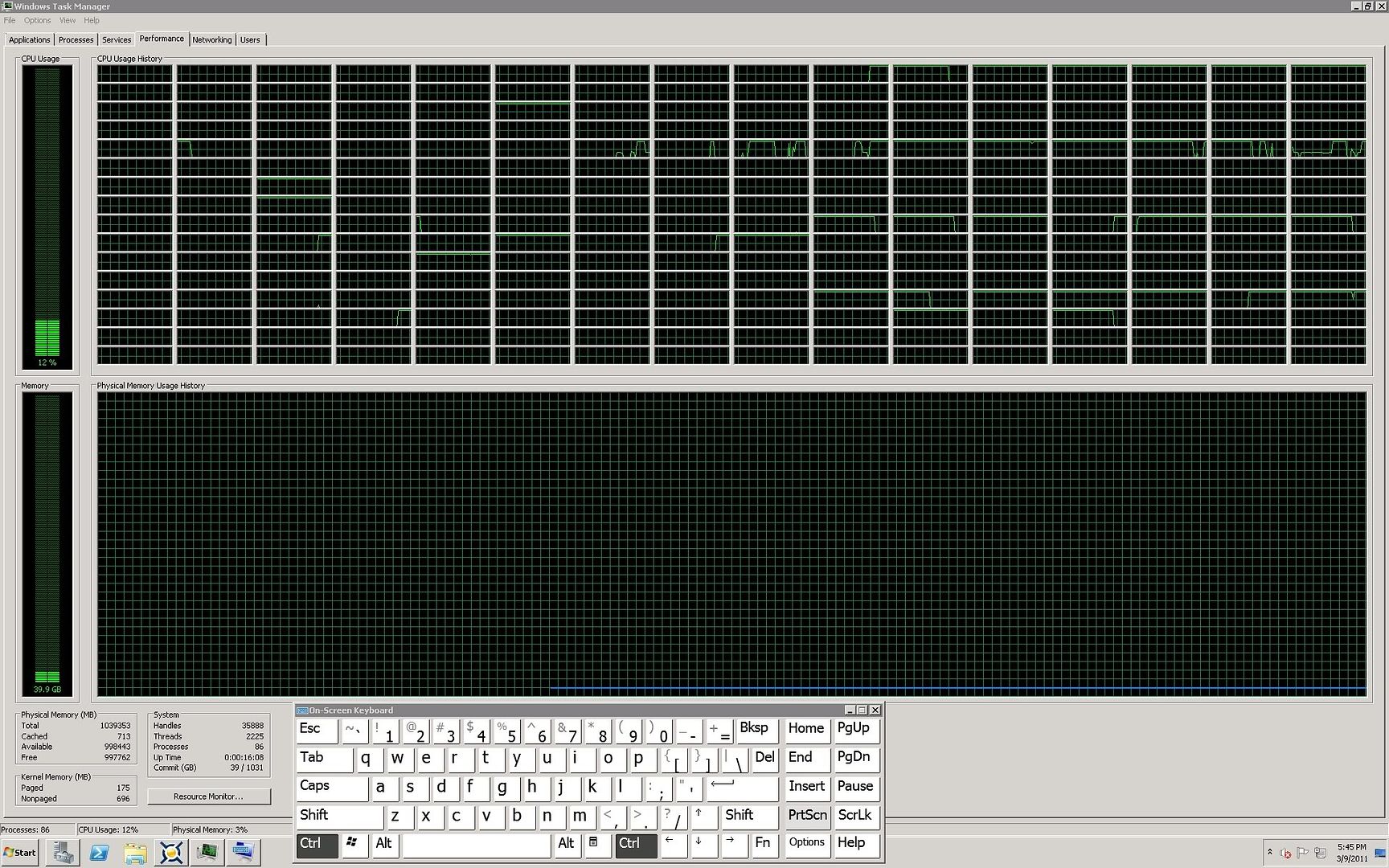 ID: 1085519 ·  |
|
Bry B Send message Joined: 3 Apr 99 Posts: 53 Credit: 832,165 RAC: 0
|
it thinks its a 32 CPU. LOL ID: 1085520 · |
 HAL9000 HAL9000  Send message Joined: 11 Sep 99 Posts: 6534 Credit: 196,805,888 RAC: 57
 |
Can you try <ncpus>128</ncpus> in a cc_config.xml and see if it uses 128 of the processors? I have a feeling that there might be limits set per user on the servers you are using. SETI@home classic workunits: 93,865 CPU time: 863,447 hours  Join the [url=http://tinyurl.com/8y46zvu]BP6/VP6 User Group[ Join the [url=http://tinyurl.com/8y46zvu]BP6/VP6 User Group[
ID: 1085522 · |
|
Bry B Send message Joined: 3 Apr 99 Posts: 53 Credit: 832,165 RAC: 0
|
Thanks, I set this on the 256 way. lets see what happens. 3/9/2011 5:58:36 PM SETI@home suspended by user 3/9/2011 5:58:41 PM Re-reading cc_config.xml 3/9/2011 5:58:41 PM Re-read config file 3/9/2011 5:58:41 PM Config: use at most 256 CPUs 3/9/2011 5:58:41 PM log flags: file_xfer, sched_ops, task, sched_op_debug 3/9/2011 5:58:41 PM Number of usable CPUs has changed from 32 to 256. Running benchmarks. 3/9/2011 5:58:41 PM Running CPU benchmarks 3/9/2011 5:58:42 PM Suspending computation - running CPU benchmarks 3/9/2011 5:58:55 PM Re-reading cc_config.xml 3/9/2011 5:58:55 PM Re-read config file 3/9/2011 5:58:55 PM Config: use at most 256 CPUs 3/9/2011 5:58:55 PM log flags: file_xfer, sched_ops, task, sched_op_debug ID: 1085523 · |
|
Bry B Send message Joined: 3 Apr 99 Posts: 53 Credit: 832,165 RAC: 0
|
[quote] That helped, went from 12 to 26 on the 256 way. Ill try it on the X64 160 now. ID: 1085525 · |
|
Bry B Send message Joined: 3 Apr 99 Posts: 53 Credit: 832,165 RAC: 0
|
[quote] Actually that really helped!! Thanks.. We are aproaching 60% on the 256way IA-64 and 90%+ on the 160LP X64. 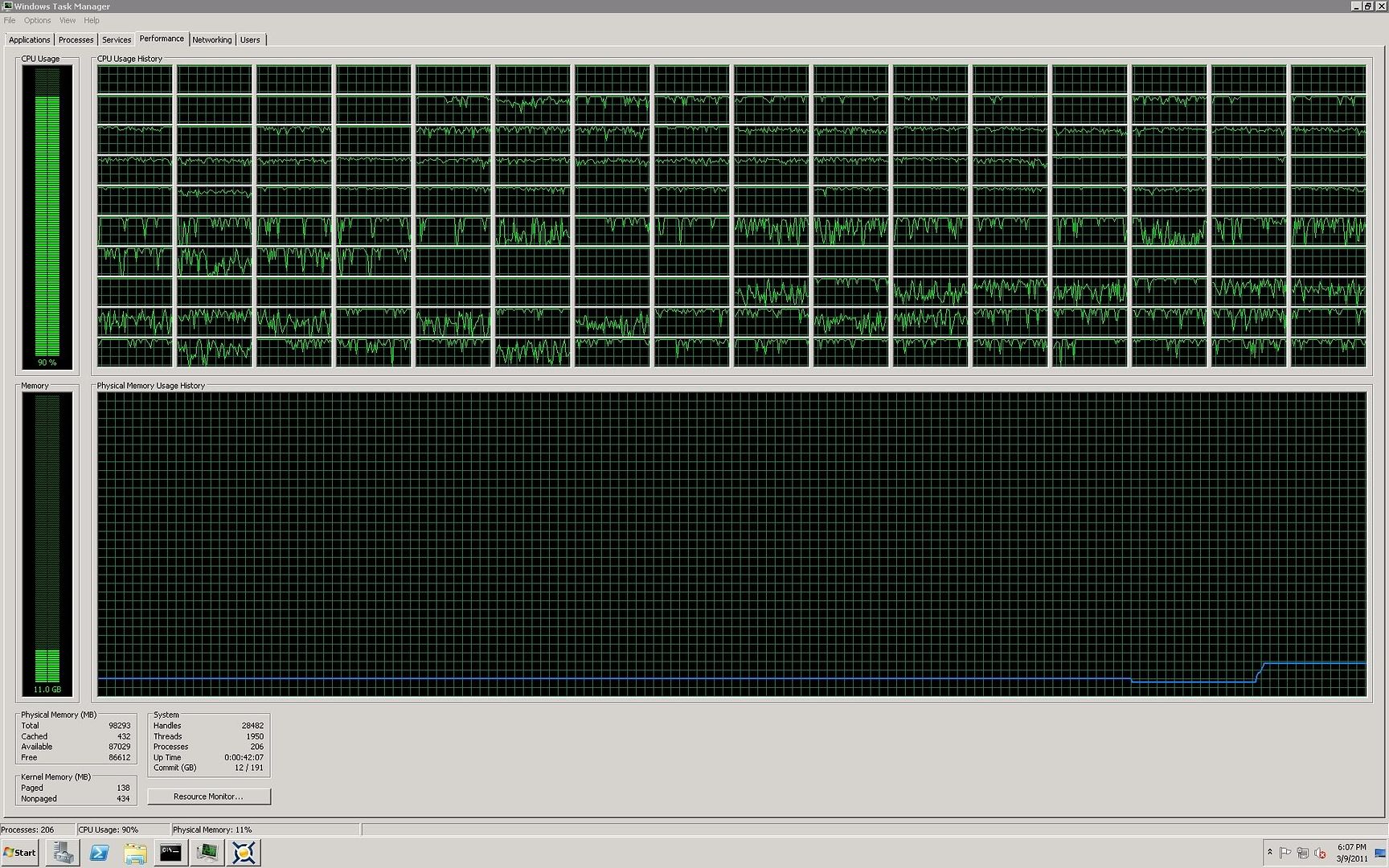 ID: 1085528 · |
|
Bry B Send message Joined: 3 Apr 99 Posts: 53 Credit: 832,165 RAC: 0
|
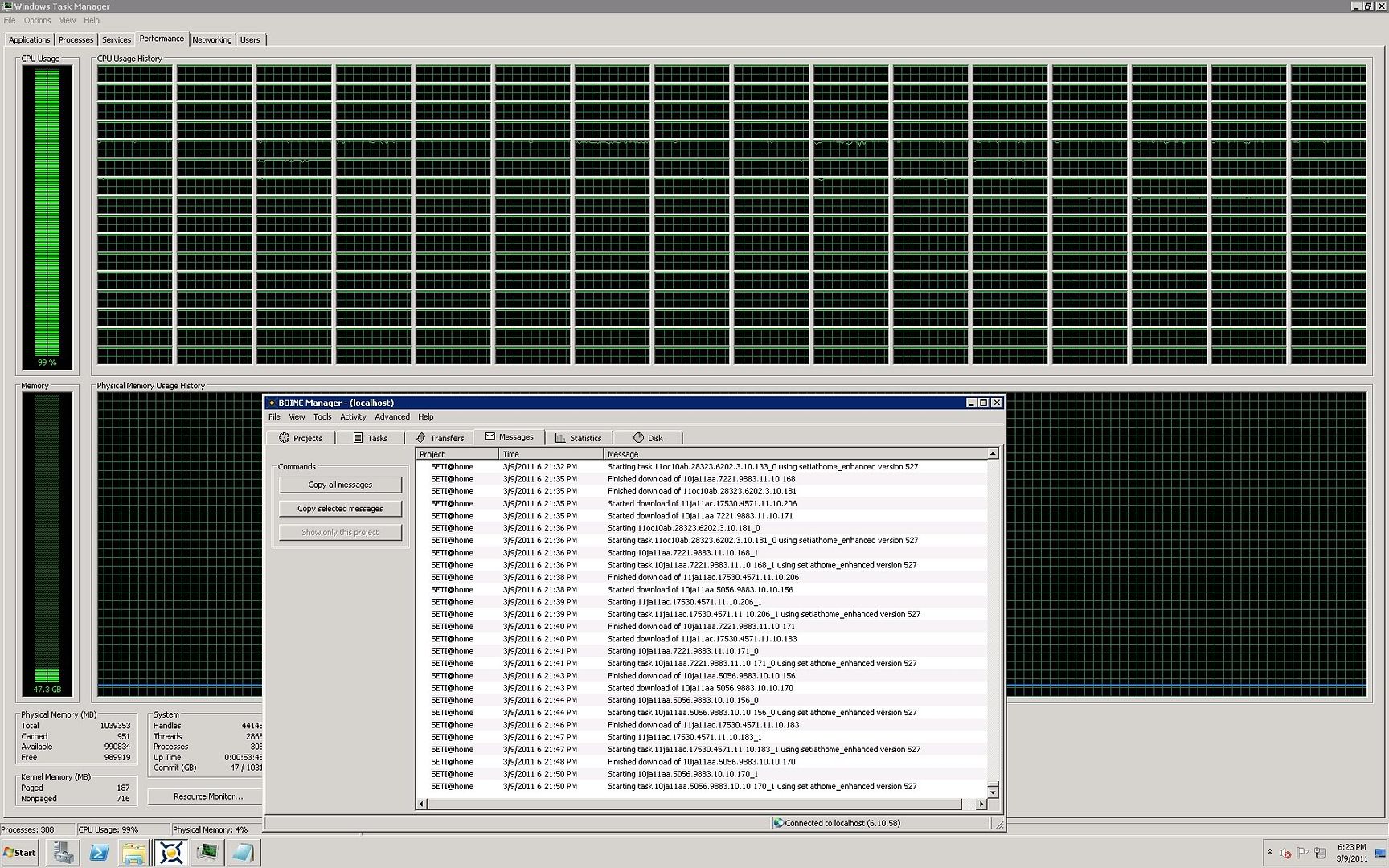
Superdome 2 is SCALING!! 99% X64 160 LP box is also at 90%!!!! 5 to 10 percent more would be awesome if anyone has ideas. this is getting easier now that I am starting to understand what you guys are talking about and understanding the tool. Thanks everyone! I think tomorrow I might throw some nasty GPU's in the X64 160 LP box and see what happens. My new memory risers will also me in which will help performance. ID: 1085533 · |
|
Bry B Send message Joined: 3 Apr 99 Posts: 53 Credit: 832,165 RAC: 0
|
 ID: 1085534 · |
|
HAL9000 Send message Joined: 11 Sep 99 Posts: 6534 Credit: 196,805,888 RAC: 57
|
Superdome 2 is SCALING!! 99% For the X64 160 LP box did you use <ncpus>160</ncpus> or a lower value? SETI@home classic workunits: 93,865 CPU time: 863,447 hours Join the [url=http://tinyurl.com/8y46zvu]BP6/VP6 User Group[
ID: 1085536 · |
|
Bry B Send message Joined: 3 Apr 99 Posts: 53 Credit: 832,165 RAC: 0
|
Superdome 2 is SCALING!! 99% I used the 160, its stable at 90-92% now ID: 1085550 · |
soft^spirit  Send message Joined: 18 May 99 Posts: 6497 Credit: 34,134,168 RAC: 0
|
It will be really interesting to see how this experiment turns out Bryan. We have many people running multiple core graphics cards to great success, if you put 512 Shaders(graphics cores) together on 2-3 tasks they have some pretty amazing results. It will be quite interesting to see if your configuration gives them a run for the money. Janice ID: 1085565 · |
|
Lint trap Send message Joined: 30 May 03 Posts: 871 Credit: 28,092,319 RAC: 0
|
Something that hasn't been mentioned yet: The guys here are talking about CPU scaling for a Dell server, which led to the power management settings: http://serverfault.com/questions/196301/disable-cpu-scaling-in-windows-server-2008-r2 and on that page below the blue banner, they mention HP's default setting ignores the OS setting. Martin edited ... Why ignore the OS settings? The Dell server setting (see above) was also preventing the expected server performance. ID: 1085566 · |
-BeNt-  Send message Joined: 17 Oct 99 Posts: 1234 Credit: 10,116,112 RAC: 0
|
Interesting in deed. 64 threads on the cpu alone should prove to be a monster cruncher! Then throwing in some gpu's on top of that, it would be interesting to see how it stacks up against a quad gpu machine with dual processors for sure. Traveling through space at ~67,000mph! ID: 1085576 · |
Wiggo  Send message Joined: 24 Jan 00 Posts: 34744 Credit: 261,360,520 RAC: 489 

|
Most likely to keep heat, energy costs and reliability in check. Cheers. ID: 1085579 · |
|
Bry B Send message Joined: 3 Apr 99 Posts: 53 Credit: 832,165 RAC: 0
|
It will be really interesting to see how this experiment turns out Bryan. Thanks! I know on the IA-64 side I probably wont be able to find a performance GPU driver so I will probably only be able to add them to the X64 side. If all goes well Ill try it tomorrow. ID: 1085592 · |
|
Bry B Send message Joined: 3 Apr 99 Posts: 53 Credit: 832,165 RAC: 0
|
Something that hasn't been mentioned yet: They are dealing with Nehalem CPU's For IA-64 this wont apply but for my X64 160P system it does. Since I work for the company in question (HP) I have all the proper settings for ACPI, Power, C-states, K groups, X2APIC etc.. Spent several months on these with our firmware and perforance guys. Great catch thanks for posting!! ID: 1085593 · |
|
ML1 Send message Joined: 25 Nov 01 Posts: 20286 Credit: 7,508,002 RAC: 20 
 |
... 160 LP system not being able to scale properly. ... Not any more according to the latest news... Good fun interesting testing there! Didn't know that Itanium systems were still being developed. Shame there isn't a credit claimed RAC that was calculated on a host so that you could immediately see what rate of processing was being done, rather than waiting a month or so for the boinc server side RAC to glacially drift through its averaging... An instant RAC would make for much easier testing... Good luck, and: Happy fast crunchin'!, Martin See new freedom: Mageia Linux Take a look for yourself: Linux Format The Future is what We all make IT (GPLv3) ID: 1085686 · |
BilBg  Send message Joined: 27 May 07 Posts: 3720 Credit: 9,385,827 RAC: 0 
|
Superdome 2 is SCALING!! 99% "I am starting to understand": Congratulations! You are the first ;) AFAIK no one have experience running BOINC/SETI on so big number of CPUs, you are exploring uncharted territories. P.S. I see you are using SSE3 app but I think your CPU Intel(R) Xeon(R) CPU E7- 2870 @ 2.40GHz supports SSSE3 http://www.cpu-world.com/CPUs/Xeon/Intel-Xeon%20E7-2870%20AT80615007266AA.html Rerun the Lunatics' Unified Installer and choose SSSE3 for faster/fastest app. Â   - ALF - "Find out what you don't do well ..... then don't do it!" :) - ALF - "Find out what you don't do well ..... then don't do it!" :)Â ID: 1085719 · |
|
Bry B Send message Joined: 3 Apr 99 Posts: 53 Credit: 832,165 RAC: 0
|
Superdome 2 is SCALING!! 99% Ahh on the X64 side, good catch. How exactly do I rerun the Lunatics' Unified Installer? Thanks in advance ID: 1085789 · |
|
HAL9000 Send message Joined: 11 Sep 99 Posts: 6534 Credit: 196,805,888 RAC: 57
|
Superdome 2 is SCALING!! 99% Double click "Lunatics_Win64v0.37_(SSE3+)_AP505r409_AKv8bx64_Cudax32f.exe" or whichever version you have. :) SETI@home classic workunits: 93,865 CPU time: 863,447 hours Join the [url=http://tinyurl.com/8y46zvu]BP6/VP6 User Group[
ID: 1085800 · |

©2024 University of California
SETI@home and Astropulse are funded by grants from the National Science Foundation, NASA, and donations from SETI@home volunteers. AstroPulse is funded in part by the NSF through grant AST-0307956.