ATI AstroPulse released
Message boards :
Number crunching :
ATI AstroPulse released
Message board moderation
| Author | Message |
|---|---|
 Raistmer Raistmer  Send message Joined: 16 Jun 01 Posts: 6325 Credit: 106,370,077 RAC: 121 
 |
There are new ATI AstroPulse apps with much improved performance and CPU utilization available @Lunatics site: http://lunatics.kwsn.net/12-gpu-crunching/astropulse-for-ati-gpus-released.msg31201.html;topicseen#msg31201 ID: 1032880 ·  |
|
Raistmer Send message Joined: 16 Jun 01 Posts: 6325 Credit: 106,370,077 RAC: 121
|
First uses OpenCL only, second uses Brook+ FFA from older hybrid build. For some configs second approach can be faster (or more reliable), for anothers - pure OpenCL will go better. So I provide both. On my own host r449 performs slightly better than r456 with default settings. From other side, r456 has 2 tunable parameters for FFA - some area for further "inplace optimization " by user. ID: 1032992 · |
Oleg  Send message Joined: 23 Jul 09 Posts: 18 Credit: 235,786 RAC: 0 
|
что то Ñ Ð½Ðµ догонÑÑŽ, ÑÑ‚Ð°Ñ‚ÑƒÑ Ñервера показывает что Ð·Ð°Ð´Ð°Ð½Ð¸Ñ Ð´Ð»Ñ ÐРеÑÑ‚ÑŒ, а мне выдает: 11.09.2010 21:09:16 | SETI@home | Requesting new tasks for CPU 11.09.2010 21:09:22 | SETI@home | Scheduler request completed: got 0 new tasks 11.09.2010 21:09:22 | SETI@home | Сообщение от Ñервера проекта: No work sent 11.09.2010 21:09:22 | SETI@home | Сообщение от Ñервера проекта: No work is available for Astropulse v5 11.09.2010 21:09:22 | SETI@home | Сообщение от Ñервера проекта: Ðет доÑтупных заданий Ð´Ð»Ñ Ð¿Ñ€Ð¸Ð»Ð¾Ð¶ÐµÐ½Ð¸Ð¹, которые Ð’Ñ‹ выбрали. ПожалуйÑта, проверьте ваши наÑтройки проекта на вебÑайте. ID: 1033017 · |
|
Raistmer Send message Joined: 16 Jun 01 Posts: 6325 Credit: 106,370,077 RAC: 121
|
что то Ñ Ð½Ðµ догонÑÑŽ, ÑÑ‚Ð°Ñ‚ÑƒÑ Ñервера показывает что Ð·Ð°Ð´Ð°Ð½Ð¸Ñ Ð´Ð»Ñ ÐРеÑÑ‚ÑŒ, а мне выдает: ПоÑмотри на загрузку Ñети: http://fragment1.berkeley.edu/newcricket/grapher.cgi?target=/router-interfaces/inr-250/gigabitethernet2_3;view=Octets;ranges=d:w Канал ÑÐµÐ¹Ñ‡Ð°Ñ Ð±Ð¸Ñ‚ÐºÐ¾Ð¼, а отправить можно только заданиÑ, которые лежат в оперативке на Ñервере (куда меньше чем в принципе готовых, что на Ñтранице напиÑано ÑтатуÑа). ПроÑто ÑÐµÐ¹Ñ‡Ð°Ñ Ð¾Ñ‡ÐµÐ½ÑŒ много народа пытаетÑÑ Ð·Ð°Ð³Ñ€ÑƒÐ·Ð¸Ñ‚ÑŒ, Ñервера до завтра (а то и поÑлезавтра) перегружены будут. ID: 1033027 · |
|
Oleg Send message Joined: 23 Jul 09 Posts: 18 Credit: 235,786 RAC: 0
|
ÑÑно, ÑпаÑибо ID: 1033037 · |
|
Raistmer Send message Joined: 16 Jun 01 Posts: 6325 Credit: 106,370,077 RAC: 121
|
OK, I have downloaded the zip file and extracted to the seti project folder, and added the extra lines from the lunatics site into the end of the app_info file and rebooted Boinc. All came up ok without any errors. I noted there was already an AP 505 entry, does that remain or is it taken out? AFAIK now, there can be few same <app></app> sections. But having one <app> section for AstroPulse and few different <app_version> sections is OK too. In short, if BOINC didn't complain in message tab about parsing errors or some missed files, very probably that all OK :) ID: 1033040 · |
|
archae86 Send message Joined: 31 Aug 99 Posts: 909 Credit: 1,582,816 RAC: 0 
|
I was in the process of writing these questions when the beginning of the major air condition outage struck. They were very fresh then, and (after editing down a few, mostly still interesting, at least to me). I have some extremely naive first-time GPU-user type questions. My excuse for asking them here is that as the ATI SETI aps move closer to mass-market distribution, you may get more people like me--who have never done CUDA work and don't know some of the "obvious" things. I've read the referenced posting at the Lunatics site, and am only asking what I believe to be additional clarification or additional coverage. Links or inline answers equally welcome. 1. In setting my BOINC Computing preferences for the location (some call it venue) of my ATI host, does my ATI card count as a processor for the number of processors limit (i.e. if 4-core CPU, should it be set to 5?). And on the % of processors limit, does it count in the numerator and not denominator--thus in same case need 125% minimum? 2. Can additional insight into the behavior of, or wisdom into good values for the following parameters set in ap_info be shared? a. <avg_ncpus>0.01</avg_ncpus> b. <max_ncpus>0.01</max_ncpus> c. <flops>15987654321</flops> 3. Are we naive users who have not run GPU before and may set a wildly wrong flops value in danger of massive over-downloading initially? Any suggested precautions for avoiding that? (such as setting an extremely small sum for the internet connection interval plus additional days work of e.g. 0.001). 4. Are we naive users who run multiple projects in danger of greatly unbalancing SETI vs. other project workload (perhaps by setting inappropriate flops number) initially? Suggested ameliorative actions? 5. Even after use has gone on for a while, may the host's Task Duration Correction Factor fluctuate strongly with the happenstance of available Astropulse handled by GPU vs. standard CPU-borne SETI work, and thus have alternation of overfetch and underfetch? Suggested ameliorative actions? 6. I believe that if I first ran my queue to zero, then did a correct install for one of these new ATI/Astropulse aps, but removed the other ap sections in my ap_info, I would receive only Astropulse downloads from SETI. Is that right, and is there any good reason not to? {edit: in the event I did run down my queue to zero, and currently have an ATI-only ap_info. When work becomes available again I can comment on how that worked). 7. I never game, and my new host has a fanless HD4550 card. I have decent case cooling support for it (an 800 rpm 120mm fan in a side port right over it, and no other add-on cards with power dissipation above the nuisance level). Am I in danger of greatly exceeding the previous temperature of my GPU? Any practical suggestions of monitoring tools, throttling methods, and practical temperatures of concern. I have and plan to watch GPU-Z. It reports 60C with 0% reported workload now, though the actual metal cage over the fins is only warm, not painfully hot. These are sincere questions, not hostile attacks. Right now have suspended Einstein and suspended SETI work fetch, and hope to have my SETI work queue down to zero in time to do a trial install this evening (U.S. MDT). Any questions answered will be a plus for me--and possibly some others. ID: 1033323 · |
|
Josef W. Segur Send message Joined: 30 Oct 99 Posts: 4504 Credit: 1,414,761 RAC: 0
|
The _ncpus values are only used for task scheduling in the core client. For a single GPU system it's fairly simple, anything less than 1 means the client won't reserve a full CPU to support the GPU. After you've observed actual usage using Task Manager you might want to edit the values to reflect that, just as preparation for possibly adding another GPU later, etc. If there are no <flops> entries at all, the core client uses the CPU Whetstone benchmark for both CPU and GPU. If there's no <flops> for the CPU applications, the <flops> for the GPU ought to be somewhat higher than the CPU's Whetstone benchmark for most hosts. If you want to run that way you might start with something like 5 times the whetstone benchmark, probably something in the 16 GFLOPS range as Raistmer is using. The best thing for a host which hasn't yet accumulated 10 validated tasks for either CPU or GPU (so it's still getting unscaled estimates) is to put in <flops> for both and force DCF to 1.0, adjusting the <flops> based on the actual runtimes of some of those initial tasks. With DCF near 1.0, when the scaled estimates start arriving there shouldn't be a sudden mix of some tasks with reasonable runtime estimates and a large overfetch of others with very short runtime estimates. 3. Are we naive users who have not run GPU before and may set a wildly wrong flops value in danger of massive over-downloading initially? Any suggested precautions for avoiding that? (such as setting an extremely small sum for the internet connection interval plus additional days work of e.g. 0.001). Only if someone believes that the advertised speed of the card is achievable in real life. Yes, setting a very small cache would obviously help ensure there isn't an initial overfetch. The other danger of setting <flops> too high is that it makes the elapsed time limit very small and may cause -177 errors. That way each 8 MB downloaded task might error out rather than be allowed time to complete normally, bad news for both the user and the project's bandwidth. 4. Are we naive users who run multiple projects in danger of greatly unbalancing SETI vs. other project workload (perhaps by setting inappropriate flops number) initially? Suggested ameliorative actions? Getting <flops> set correctly stabilizes DCF and the core client has a sensible basis for work fetch and sharing resources with other projects. 6. I believe that if I first ran my queue to zero, then did a correct install for one of these new ATI/Astropulse aps, but removed the other ap sections in my ap_info, I would receive only Astropulse downloads from SETI. Is that right, and is there any good reason not to? {edit: in the event I did run down my queue to zero, and currently have an ATI-only ap_info. When work becomes available again I can comment on how that worked). Yes, the BOINC servers won't send work to an anonymous platform host unless it claims to have an application to do the work. I won't try to answer 7. Joe ID: 1033354 · |
BilBg  Send message Joined: 27 May 07 Posts: 3720 Credit: 9,385,827 RAC: 0 
|
7. I never game, and my new host has a fanless HD4550 card. I have decent case cooling support for it (an 800 rpm 120mm fan in a side port right over it, and no other add-on cards with power dissipation above the nuisance level). Am I in danger of greatly exceeding the previous temperature of my GPU? Any practical suggestions of monitoring tools, throttling methods, and practical temperatures of concern. I have and plan to watch GPU-Z. It reports 60C with 0% reported workload now, though the actual metal cage over the fins is only warm, not painfully hot. Try TThrottle for automatic Temperature regulation or some of the other Temperature Monitoring Programs: http://setiathome.berkeley.edu/forum_thread.php?id=59292 Â   - ALF - "Find out what you don't do well ..... then don't do it!" :) - ALF - "Find out what you don't do well ..... then don't do it!" :)Â ID: 1033430 · |
|
Raistmer Send message Joined: 16 Jun 01 Posts: 6325 Credit: 106,370,077 RAC: 121
|
I'm not prepared to discuss flops values in full, better refer Richard's thread about setting flops. (sticky one) Listed value was recived by adjusting estimations for my own host (Q9450+ATI HD4870). Currently I have pretty correct estimations and no -177 errors. IMO for first attemt same value can be used. For reference HD4870 should complete AP task (not heavely blanked one) in less thsn 5 hours. If your time estimation greatly exceed this value you should increase flops. If estimation much lower - decrease flops. HD5xxx GPUs tend to work faster in spite of no 5xxx-special features used. And one more note about this app - there can be no compatibility with CPU stock/opt app by checkpoints. That is, better not transfer already started tasks between CPU and GPU. Sometimes it will resume just OK, sometime it will fail or produce invalid results. I have no intentions to maintain checkpoints compatibility in future too cause GPU build just don't need most of data saved in CPU checkpoint and writing that data to GPU checkpoint will introduce unneeded overhead. ID: 1033471 · |
|
archae86 Send message Joined: 31 Aug 99 Posts: 909 Credit: 1,582,816 RAC: 0
|
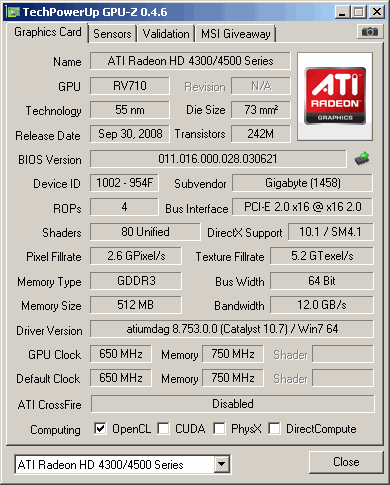
I have some extremely naive first-time GPU-user type questions. Possibly bad form to reply to my own post, but I thought it might possibly be useful for me to add some first-time user experience comments to the expert replies already provide by Raistmer and Josef S. Segur. The system is a very recently assembled Windows 7 PC with an E5620 (Westmere) running hyperthreaded. The Graphics card is a Gigabyte GV-R455D3-512I. It is a fanless card which after rebate will have cost me $30. I had not thought of either gaming or crunching with it, but when I saw the processor type on the ATI page of supported types pointed to by the Lunatics page, I decided to give it a try. As specified on the Lunatics page about using these aps, I installed the ATI stream SDK and the Catalyst 10.7 driver set. For ap_info, I made a bare-bones one out of the example posted on the Lunatics page (with the numeric parameters for flops and such left as there), only adding the surroundings required to make it a full ap_info with no other aps specified. My intention was fully to occupy my eight CPU threads with Einstein on this host, and to keep the graphics processor busy with Astropulse work. So far, this seems to be working as hoped. As the first attempts to get an Astropulse WU were made only a few hours into the September 16 recovery, it took the system hours to get granted a unit, and quite a few download retries before it came through, but from there things seem so far to have been smooth. Initially I had left the computing preferences item specifying "Suspend GPU work while computer is in use?" at Yes. Overnight with me not present the job made lots of progress, but with my copy of BOINCMgr (6.10.58) this indeed worked, so the job paused a lot. I've since changed this to "no", and have not yet noticed adverse effect, but on negligible testing. The 4550 is not a high-end implementation at all. (very) preliminary measurement suggests that the added power consumption at the system input plug is in the ten to twenty watt range (full Astropulse vs. idle). The reported GPU temperature rise is about 20 to 25C (highest seen so far about 83C). My card is fanless, but the card location is unusually well ventilated with a 1150 rpm 120mm side fan blowing air pretty directly to its benefit. I harbor a doubt that the sensors are well calibrated (Intel CPU temp sensors are biased all over the lot, have slope errors, and even slope discontinuities, so this would not be unprecedented). 58C is the lowest I have seen, in a cool room, card at idle, with all that fan ventilation, which seems higher than plausible to me. In sum, for my particular case I'm not currently worried about over-stressing the 4550 by 100% use. And the contribution to box thermal problems for me is a non-issue. As to performance, It currently shows as 67.6% done with 8 hours 51 minutes "elapsed" reported by BOINCMgr. [edited to add: The CPU application running to support the ATI card doing the numeric processing appears to be consuming about 5% of one equivalent virtual core, so somewhat under 1% of the total CPU capacity. Others with faster graphics cards and slower CPUs may well see this rather higher--but this is quite nice). Here is a link to a screen capture of what GPU-Z reports about my card for general information: card info And this link gives sensor information, as stabilized running this Astropulse ap at a room ambient of 21C. temperatures, utilization, and clocks GPU-Z describes the fan speed percentage entry as that reported by the on-die controller. As the card is fanless, this may be garbage data. A more optimistic view may be that the controller is only asking for 41% output if it had a fan to control, so does not regard the die temperature as terribly excessive As to power, here are some system power input numbers. The E5620 is running a moderate overclock at 3.4 GHz and 1.14 reported CPU voltage. 236W 8 Einstein Global Correlations + 1 ATI Astropulse 142W 1 Astropulse 128W All BOINC suspended] ID: 1033563 · |
skildude  Send message Joined: 4 Oct 00 Posts: 9541 Credit: 50,759,529 RAC: 60 
|
to jsut monitor the GPU temp you can use the GPU-Z app. it works fine. I would consider an aftermarket GPU cooler. Question: have you ran any other project that uses the GPU and have you checked the temps then? Your temps will be similar using the Astropulse app. I'd look into an aftermarket HSF for your GPU  In a rich man's house there is no place to spit but his face. Diogenes Of Sinope ID: 1033659 · |
Jord  Send message Joined: 9 Jun 99 Posts: 15184 Credit: 4,362,181 RAC: 3 
|
Not bad. First one ran in approx. 5.5 hours. The second one in 2 seconds, but that looks to be a task error: Error in ap_remove_radar.cpp: generate_envelope: num_ffts_performed < 100. Blanking too much RFI? Max GPU temperature, 51C. Max GPU load, ~90%. No slowdown problems as seen with Brook+ apps. Third is downloading as I type. ID: 1033746 · |
|
archae86 Send message Joined: 31 Aug 99 Posts: 909 Credit: 1,582,816 RAC: 0
|
Max GPU temperature, 51C. Where did you see that? GPU-Z? something else? For your system, what does the same monitoring method give for GPU temperature at idle? The SETI page for your hosts lists the graphics processor as: CAL ATI Radeon HD 4700/4800 (RV740/RV770) (1024MB) driver: 1.4.696 What is the particular product you have? ID: 1033763 · |
|
Jord Send message Joined: 9 Jun 99 Posts: 15184 Credit: 4,362,181 RAC: 3
|
For your system, what does the same monitoring method give for GPU temperature at idle? 37C. Tool used: GPU-Z. The SETI page for your hosts lists the graphics processor as:CAL ATI Radeon HD 4700/4800 (RV740/RV770) (1024MB) driver: 1.4.696 HD4850 1GB PCI-E 2.0 Cats 10.7 (why change when it works... ) Apropos, perhaps that the use of 3 x 80mm case fans - one directly above the GPU - does lots to keeping the heat down inside the case. The only dust I have seen on there since I put together the system is on the air-inlet rasters. Surprisingly good at keeping itself dust free so far, considering the amount of furry friends we have around here. :) Edit: before you ask, I just started up CoreTemp, to check the CPU temperature. 55C for core 0, 57C for core 1 (plus same for their HT compadres). ID: 1033766 · |
|
Jord Send message Joined: 9 Jun 99 Posts: 15184 Credit: 4,362,181 RAC: 3
|
OK, I have to ask. I've seen this behaviour on 2 OpenCL APs now. It starts up, taking about 78MB physical memory, runs for about 2 minutes then stops using the GPU. The next 10 to 20 minutes it's using the CPU only, memory usage slowly increasing to ~230 - ~280MB. Then the GPU kicks back in and physical memory is slowly bleeding back to 78MB. What's happening in the 10-20 minutes and to 230 - 280MB increase? Is it making an array of (simulated) (possible) work to do, to then start on the best one? ID: 1033985 · |
|
Raistmer Send message Joined: 16 Jun 01 Posts: 6325 Credit: 106,370,077 RAC: 121
|
OK, I have to ask. I've seen this behaviour on 2 OpenCL APs now. Do you use single GPU or multi-GPU host? Also, check blanking % of task. CPU usage can increase greatly for heavy blanked tasks (cause blanking processed on CPU for now). I got reports about very fast exits due to excessive blanking ~100%. It means current AP tasks are very noisy ones. Not the best example for app capabilities... but we crunch what we get ;) More insights stderr log of completed result could give. ID: 1033993 · |
|
Jord Send message Joined: 9 Jun 99 Posts: 15184 Credit: 4,362,181 RAC: 3
|
Do you use single GPU or multi-GPU host? Single GPU. But the GPU isn't used during the memory increase. It's the computer's RAM that's filled and then bled, not the video RAM. CPU usage is between 2 and 20% at that time (although that's out of context, seeing as I use 2 cores plus HT = 4, the amount should probably be 8 to 80% of one core). Also, check blanking % of task. I had one already, it ran for all of 5 seconds, then quit with the "Error in ap_remove_radar.cpp: generate_envelope: num_ffts_performed < 100. Blanking too much RFI?" message in stderr.txt. The wingperson had the same error on CPU, so it was the task. I am not asking about the CPU usage, more about the memory usage at the very start of the task. ID: 1033997 · |
|
Raistmer Send message Joined: 16 Jun 01 Posts: 6325 Credit: 106,370,077 RAC: 121
|
I am not asking about the CPU usage, more about the memory usage at the very start of the task. These things interconnected. Blanking done on CPU, that is, raw task data can't be splitted right on GPU as w/o blanking. The should be downloaded back to CPU, blanked and pushed back to GPU memory. Usually it should not lead to such great host memory increase. But ATi's SDK is very funny thing. Some observations allow to conclude that each GPU memory allocation can lead to same amount of host memory allocation. Moreover, additional memory can be allocated for some caching purposes. That is, I think this behavior is ATi's implementation-depended and can change in future driver/SDK releases. Try to catch non-blanked task and see if this great and long memory increase w/o GPU usage be in place or not. ID: 1034010 · |
|
Jord Send message Joined: 9 Jun 99 Posts: 15184 Credit: 4,362,181 RAC: 3
|
Try to catch non-blanked task and see if this great and long memory increase w/o GPU usage be in place or not. lol... if you think I am going to sit here and check each and every AP that comes along... no thanks. Although it will be another 5.5 hours before any next one starts (if they managed to download), I still have seasons 6 through 10 to go through of Stargate SG-1. A better and more enjoyable use of my time. :) Thanks for the answer on why it's taking that much memory. I wasn't worried or anything, just curious and interested. And it may answer the worries of anyone passing by next. :) Now here's to hoping I don't have to reboot every 4 tasks.. This morning I found GPU-Z showing nothing of GPU load, while BOINC said the task had been running for an hour, with zero percent progress. Exititng & restarting BOINC didn't help, so I went for a reboot. Even though the stderr.txt didn't say anything about extreme memory usage at the time. The reboot fixed whatever was wrong, though. ID: 1034018 · |


©2024 University of California
SETI@home and Astropulse are funded by grants from the National Science Foundation, NASA, and donations from SETI@home volunteers. AstroPulse is funded in part by the NSF through grant AST-0307956.